Abstract
When we begin studying OpenGL, it is easy to form the wrong idea about what it is.
Some people think OpenGL is a graphics engine. Others think it is a library that draws 3D models automatically. Still others imagine that OpenGL is the GPU itself.
Not quite.
OpenGL is a graphics API defined by a specification. This specification establishes the functions, types, constants, behavior, and rules through which a program can ask an OpenGL implementation to perform rendering operations.
This means that OpenGL is not a graphics engine, a ready-made 3D scene, an editor, or the hardware. It is the interface between our program and a concrete implementation, normally provided by the system's graphics stack and driver.
In this article, I want to clarify what OpenGL really is, why it works as a state machine, what roles the implementation, driver, and GPU play, and why modern OpenGL requires shaders, buffers, VAOs, and draw calls instead of “magic” functions for drawing objects.
Let us therefore see what we are actually using when we write OpenGL code.
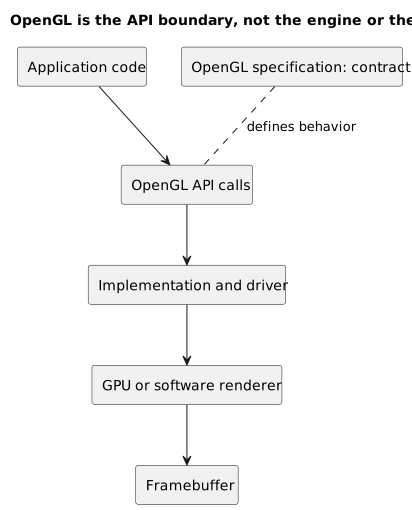
OpenGL sits between our program and the concrete implementation: the specification defines the contract, while drivers and hardware perform the available work on the platform.
Why This Distinction Matters
When learning OpenGL, many difficulties arise not from an individual command, but from the wrong mental model.
If I think OpenGL is a graphics engine, I expect high-level functions such as:
drawModel("house.obj");createLight();setCameraPosition();loadScene();OpenGL does not work that way.
OpenGL does not understand the concepts of a “house,” “cinematic light,” “character,” “realistic material,” or “scene.”
It works with lower-level concepts:
- buffers;
- textures;
- shader programs;
- framebuffers;
- vertex array objects;
- primitives;
- state;
- draw calls.
This means that the programmer must explicitly prepare a great deal of data and configuration.
At first, this can seem inconvenient. Yet this inconvenience is precisely what makes OpenGL useful for learning graphics: it forces us to see the parts that a graphics engine normally hides.
Unity, Unreal Engine, and Godot let us work at a higher level. OpenGL, by contrast, makes us reason closer to the pipeline.
Not at the lowest possible level, because the implementation, driver, and, in most cases, hardware still exist beneath the API. It is low enough, however, to understand how data travels through the pipeline and contributes to an image.
OpenGL Is a Specification
The first thing to understand is that OpenGL is not, in itself, a single program installed on a computer.
It is an API described by a specification.
A specification is a technical document that describes how a particular API must behave.
The Khronos OpenGL Registry contains the OpenGL API and GLSL specifications, extensions approved by Khronos and vendors, headers, and other related documents.
This means that the specification defines, for example:
- which functions exist;
- which parameters they accept;
- which errors they can generate;
- which objects they manipulate;
- which state they modify;
- which results they must produce;
- which versions support particular features.
The specification is not the GPU, however.
The specification is the rulebook.
The concrete implementation is provided by the platform or graphics driver and must respect the behavior defined by the specification.
Specification and Implementation
We can use an analogy to understand the difference.
Imagine a highway code.
The highway code establishes rules:
- stop at a red light;
- proceed at a green light;
- drive on a particular side of the road;
- observe the speed limits.
The highway code, however, is not the car.
In the same way, the OpenGL specification establishes rules and behavior, but it is not the software that actually executes the commands.
In the most common setup, the OpenGL implementation is part of the graphics stack and communicates with the hardware driver. Software implementations also exist: the specification defines the result and observable behavior, but does not require a physical GPU.
When our program calls an OpenGL function, then, it is not speaking directly to a PDF document. It is calling a function exposed by an OpenGL implementation available on the system.
That implementation performs the requested operations using the available driver and hardware or, when necessary, a software path.
The General Path
In simplified form, the path looks like this:
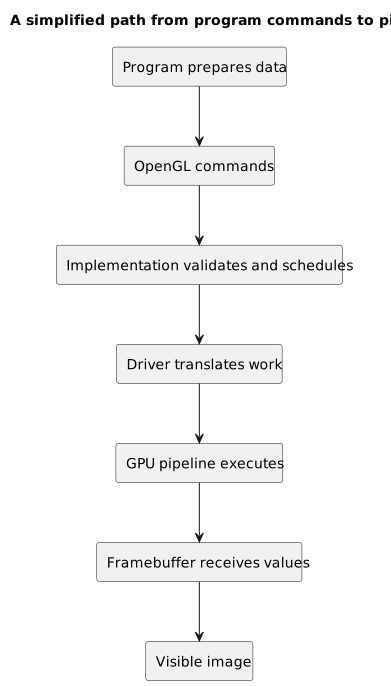
The program prepares data and commands; the implementation validates, translates, and moves them toward the framebuffer through the driver and pipeline.
program ↓OpenGL calls ↓OpenGL implementation / graphics driver ↓GPU or software execution ↓framebuffer ↓optional presentation on the screenOur program prepares data and submits commands through the OpenGL interface. The implementation carries out the requested behavior and, when rendering is hardware accelerated, communicates with the driver and the GPU.
The framebuffer stores the values produced by rendering. If we are drawing to a window's default framebuffer, the window system can then present its contents on the screen.
Naturally, the real path is far more complex. The implementation may validate, batch, defer, or internally reorganize work, provided that it preserves the observable behavior required by the specification. The GPU may execute operations in parallel, while queues, synchronization, and several kinds of memory also come into play.
For now, however, this chain is enough to understand OpenGL's role.
OpenGL Is Not the GPU
Saying that “OpenGL draws” is convenient, but technically imprecise.
OpenGL defines the interface through which we request rendering operations. In accelerated implementations, the GPU performs the graphics work; the driver and implementation translate API commands into operations suitable for the available system.
When we write:
glDrawArrays(GL_TRIANGLES, 0, 3);we are not telling the CPU to color every pixel manually.
We are sending a request to the graphics system: use the current state, read the configured vertices, interpret the data as triangles, and begin rendering according to the pipeline.
The glDrawArrays function uses sequential elements from the enabled vertex attribute arrays to construct geometric primitives; the mode parameter specifies how those elements should be assembled.
Therefore, glDrawArrays does not “contain” the entire rendering algorithm in our code. It is a call into the OpenGL implementation that initiates a much larger process.
OpenGL Is Not a Graphics Engine
A graphics engine provides high-level tools.
For example, an engine may manage:
- scenes;
- entities;
- components;
- materials;
- lights;
- shadows;
- animations;
- physics;
- a visual editor;
- asset importing;
- audio;
- scripting;
- collisions;
- particle systems;
- build pipelines.
OpenGL does not provide all of this.
OpenGL cannot automatically load an .obj file, nor does it have the concept of a camera as a scene object. It does not know about PBR materials, directional lights, or node hierarchies as ready-made abstractions.
All of these abstractions can be built on top of OpenGL, but they are not part of OpenGL itself.
Instead, OpenGL provides lower-level operations:
- create buffers;
- upload data;
- configure attributes;
- compile shaders;
- create textures;
- set state;
- issue draw calls;
- write to a framebuffer.
This is why drawing a single triangle requires so many steps.
Not because the triangle is difficult, but because we are manually building the minimum environment required for the pipeline to work.
API, Library, Framework, and Engine
It is worth distinguishing a few terms.
An API is a programming interface. It defines how a program can use certain features.
A library is a collection of reusable code. It may implement functions, data structures, algorithms, or services.
A framework often imposes a broader structure on an application. It provides not only functions, but also a way to organize the program.
A graphics engine is a more complete system that manages many aspects of producing and rendering a scene.
OpenGL is a graphics API.
GLFW, which we will use to create windows and contexts, is a library.
GLAD is a loader-generator: we will use the code it produces to load pointers to OpenGL functions.
Unreal Engine is an engine.
Keeping these terms separate prevents many misunderstandings.
OpenGL and the Context
To issue OpenGL commands, an OpenGL context must be current on the thread that executes them.
The context is the environment in which OpenGL state lives.
We can think of it as a laboratory that holds:
- current state;
- objects created by or shared with other contexts;
- configurations;
- bindings;
- associated resources;
- version information;
- available capabilities.
The specification describes a GL machine made of queryable state, bindings, and objects. Not everything is exclusive to one context, however: some objects can be shared among contexts created compatibly, while other state remains specific to an individual context.
A context can be current on only one thread at a time, and a thread can have only one current context. Without this association, we cannot correctly use OpenGL functions that depend on a context.
In this series, we will use GLFW to create a window and its corresponding context, then make that context current. OpenGL itself does not require rendering to target a visible window, however: offscreen configurations also exist.
This will be the subject of the next article.
OpenGL as a State Machine
One of the most important concepts is this:
OpenGL works as a state machine associated with the current context.
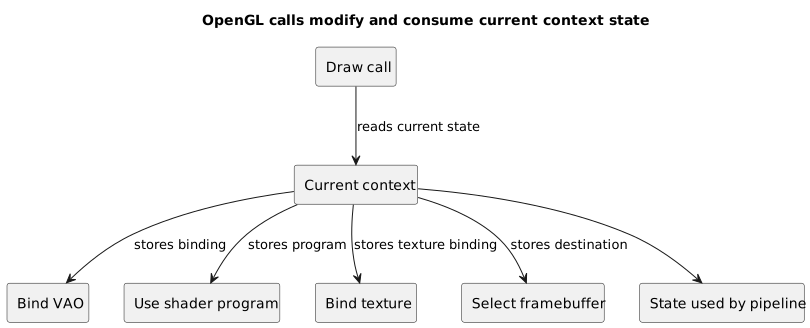
OpenGL calls modify or consume current context state: a draw call uses what was configured before it.
A state machine retains current configurations.
When we call certain functions, we are not necessarily drawing anything immediately. Often, we are changing state that later calls will use.
For example:
glUseProgram(shaderProgram);This function does not draw anything.
If the program object was linked successfully, glUseProgram installs its executable code as part of the current rendering state.
Consider another example:
glBindVertexArray(vao);This function does not draw anything either.
It makes the specified Vertex Array Object current. In OpenGL 3.3 core, that name must be either 0 or a value returned by an earlier call to glGenVertexArrays; drawing from arrays then requires a properly configured, nonzero VAO.
Therefore, when we later call:
glDrawArrays(GL_TRIANGLES, 0, 3);OpenGL uses the current state:
- which VAO is bound;
- which shader program is active;
- which buffers and attributes the VAO references;
- which viewport is set;
- which tests are enabled;
- which framebuffer is bound.
This is one of the main reasons OpenGL can seem difficult at first.
Looking at the draw call alone is not enough. We need to know the state in which it was issued.
An Analogy: The Workbench
Imagine a workbench.
Before building something, we prepare the bench:
- we set out the materials;
- choose the tools;
- open the instructions;
- set the measurements;
- decide where to place the result.
Only then do we say, “build.”
OpenGL works in a similar way.
First, we configure:
glUseProgram(shaderProgram);glBindVertexArray(vao);Then we draw:
glDrawArrays(GL_TRIANGLES, 0, 3);If we prepared the workbench incorrectly, the result will be wrong.
If we forgot the shader, OpenGL will not use the correct program.
If we bound the wrong VAO, OpenGL will read the wrong configuration.
If the VAO does not reference buffers containing valid data, the triangle will not appear.
Keep one detail in mind, because it will prevent confusion later: after we configure the attributes, the VAO retains the necessary references to the vertex buffers. We do not need to bind GL_ARRAY_BUFFER again before every glDrawArrays; we need to bind the correct VAO.
A black screen often originates not in the draw call itself, but in state that was configured incorrectly before the draw call.
Binding
Binding is the mechanism through which we associate an OpenGL object with a particular binding point in the context.
For example:
glBindBuffer(GL_ARRAY_BUFFER, vbo);Here we are saying:
The
vbobuffer becomes the buffer currently associated with theGL_ARRAY_BUFFERtarget.
After this call, if we execute:
glBufferData(GL_ARRAY_BUFFER, sizeof(vertices), vertices, GL_STATIC_DRAW);OpenGL knows which buffer should receive the data because that buffer is currently bound to GL_ARRAY_BUFFER.
This is a common pattern in the OpenGL 3.3 code we will use:
create objectbind objectconfigure object through its targetuse objectThe advantage is that many functions do not need to receive the object directly as a parameter every time. The disadvantage is that we must keep track of the current state. Later versions of the API also introduced direct state access functions, but they are not available in the OpenGL 3.3 core and we do not need them yet.
OpenGL Objects
OpenGL uses many kinds of objects.
Some examples include:
- buffer objects;
- vertex array objects;
- texture objects;
- shader objects;
- program objects;
- framebuffer objects;
- renderbuffer objects;
- query objects;
- sampler objects.
An OpenGL object is often identified by an integer called a name and, in everyday terminology, also a handle.
For example:
unsigned int vbo;glGenBuffers(1, &vbo);After this call, vbo contains a previously unused name that OpenGL has now reserved.
This identifier is not the buffer in the C++ sense.
It is not a pointer to a structure that we can inspect directly.
After glGenBuffers, the object does not yet fully exist: the name acquires buffer state when it is bound for the first time with glBindBuffer. From that point onward, OpenGL uses it to refer to the internal resource.
This distinction matters. We must not treat a GLuint as if it were a regular C++ object. It is only a numeric identifier; the OpenGL implementation manages the resource and its state.
Create, Bind, Configure, Delete
Many OpenGL objects follow a similar lifecycle.
For a buffer, we first request a name:
glGenBuffers(1, &vbo);Then we bind it:
glBindBuffer(GL_ARRAY_BUFFER, vbo);Next, we configure it or upload data:
glBufferData(GL_ARRAY_BUFFER, sizeof(vertices), vertices, GL_STATIC_DRAW);We then use it during rendering.
Finally, when it is no longer needed, we delete it:
glDeleteBuffers(1, &vbo);With some variation, this approach also applies to textures, VAOs, framebuffers, and other objects.
For now, the important point is that OpenGL manages resources. Our program creates names and asks OpenGL to associate those names with internal resources.
Context State and Call Order
In OpenGL, the order of calls is fundamental. When we informally speak of “global state,” we mean the current state visible through a particular context, not one configuration shared by the entire process.
This code makes sense:
glBindBuffer(GL_ARRAY_BUFFER, vbo);glBufferData(GL_ARRAY_BUFFER, sizeof(vertices), vertices, GL_STATIC_DRAW);First, we bind the buffer.
Then we upload data to the bound buffer.
If we reverse the order, however:
glBufferData(GL_ARRAY_BUFFER, sizeof(vertices), vertices, GL_STATIC_DRAW);glBindBuffer(GL_ARRAY_BUFFER, vbo);the first call does not upload data to vbo, because vbo is not bound yet.
Another buffer might be bound, in which case we would modify that one. If the name 0 is bound to the target instead, glBufferData generates GL_INVALID_OPERATION. The result depends on the current state.
This is why OpenGL must be studied patiently.
The functions are not isolated. They form a sequence.
Modern and Historical OpenGL
“Modern OpenGL” is not the formal name of a version. We usually use this expression to refer to an approach based on:
- shaders;
- buffer objects;
- vertex array objects;
- the programmable pipeline;
- GLSL;
- explicit draw calls;
- more direct management of data.
In the past, OpenGL also allowed a more immediate style based on functions such as glBegin and glEnd.
A historical example might look like this:
glBegin(GL_TRIANGLES);glVertex3f(-0.5f, -0.5f, 0.0f);glVertex3f(0.5f, -0.5f, 0.0f);glVertex3f(0.0f, 0.5f, 0.0f);glEnd();This style is easier to read at first because it seems to say directly, “draw these three vertices.”
It does not, however, represent the programmable pipeline that we want to study.
In a modern core profile, vertex data resides in buffers and programmable stages are controlled through shaders.
For this reason, we will not base this series on glBegin and glEnd.
Not because they are historically irrelevant, but because we want to learn the right mental model for modern graphics.
OpenGL Core and Compatibility Profiles
OpenGL has gone through many versions.
To maintain compatibility with older code, some implementations provide a compatibility profile.
The compatibility profile retains many historical features.
The core profile, by contrast, excludes features that have been removed from the API, including the old fixed-function pipeline and the immediate mode used in the previous example.
When we use OpenGL 3.3 core, we must therefore configure a programmable pipeline and use a nonzero VAO for array-based draw calls. We cannot rely on the historical fixed-function pipeline.
This choice is useful from a teaching perspective.
It forces us to understand:
- how to send data to the GPU;
- how to write shaders;
- how to configure attributes;
- how to issue draw calls;
- how to reason about the pipeline.
In other words, it lets us learn modern OpenGL instead of a simpler historical model that is less representative of current graphics programming.
Fixed-Function and Programmable Pipelines
The fixed-function pipeline was a model in which many parts of rendering were already defined by the API.
The programmer could configure lights, materials, and transformations through OpenGL functions, but did not write shaders directly to control certain stages.
The programmable pipeline, by contrast, lets us provide executable programs for the implementation's configurable stages.
These programs are shaders.
For the basic rendering in this series, we will use at least two stages:
- the vertex shader;
- the fragment shader.
The vertex shader processes each vertex and must produce its position in clip space.
The fragment shader processes fragments and may produce one or more output values, normally colors. It can also discard a fragment and, in specific cases, write its depth.
The GLSL specification defines shaders as programs intended for the programmable stages of the pipeline.
This transition is central.
Modern OpenGL does not try to guess how to light or transform a scene. It requires the programmer to define that behavior explicitly through shaders and pipeline state.
What a Draw Call Actually Does
A draw call asks OpenGL to draw something using the current state.
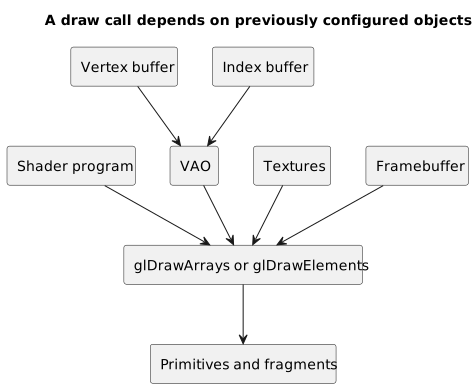
A draw call does not contain everything by itself: it depends on previously configured shaders, VAOs, buffers, textures, and framebuffers.
For example:
glDrawArrays(GL_TRIANGLES, 0, 3);Or:
glDrawElements(GL_TRIANGLES, 6, GL_UNSIGNED_INT, 0);With glDrawArrays, OpenGL uses a sequence of vertices from the enabled arrays.
With glDrawElements, OpenGL uses indices to construct primitives from the enabled vertex attribute arrays.
The second example also assumes that the current VAO references a valid EBO: the final argument, 0, represents a zero-byte offset into the index buffer.
The draw call does not include all the data as parameters.
We do not pass these values directly:
- the shader program;
- buffers;
- attributes;
- textures;
- the framebuffer;
- the viewport.
Many of them are already part of the current state.
A draw call is therefore short because it relies on everything configured beforehand.
This is powerful, but also dangerous: if the current state is not what we think it is, the result will be wrong.
A Concrete State Example
Suppose we want to draw a triangle.
A simplified sequence might look like this:
glUseProgram(shaderProgram);glBindVertexArray(triangleVao);glDrawArrays(GL_TRIANGLES, 0, 3);The draw call uses:
- the
shaderProgramshader program; - the
triangleVaoVAO; - the buffers and attributes referenced by that VAO;
- the active framebuffer;
- the active viewport;
- blending, depth testing, and other state.
Now suppose we have two triangles with different VAOs:
glUseProgram(shaderProgram);glBindVertexArray(firstTriangleVao);glDrawArrays(GL_TRIANGLES, 0, 3);glBindVertexArray(secondTriangleVao);glDrawArrays(GL_TRIANGLES, 0, 3);Here we use the same shader program, but two different VAOs.
If we forget the second glBindVertexArray, the second draw call will still use the first VAO.
This is a typical state-related error.
OpenGL and Function Loading
Another aspect that confuses beginners is loading OpenGL functions.
On many platforms, including a header is not enough to call every modern OpenGL function.
We must obtain pointers to the functions available for the current context.
For this purpose, we will use a tool such as GLAD.
GLAD is not OpenGL.
GLAD is a loader-generator: the code it generates loads pointers to the requested and available OpenGL functions.
GLFW is not OpenGL either.
Among other things, GLFW creates windows and OpenGL contexts, handles events, and obtains the addresses of functions exposed by the platform.
A typical initial setup will therefore look like this:
GLFW → creates a window and contextGLFW → makes the context currentGLAD → loads pointers to OpenGL functionsOpenGL implementation → receives and executes commands through the contextWe will cover this process in the next article.
OpenGL and GLSL
OpenGL works together with GLSL, the OpenGL Shading Language.
GLSL is the language in which we write shaders.
In addition to the OpenGL API specifications, the Khronos OpenGL Registry contains the specifications for the shading language.
A minimal vertex shader can look like this:
#version 330 corelayout (location = 0) in vec3 aPos;void main(){ gl_Position = vec4(aPos, 1.0);}A minimal fragment shader can look like this:
#version 330 coreout vec4 FragColor;void main(){ FragColor = vec4(1.0, 0.4, 0.2, 1.0);}OpenGL provides the functions required to create, compile, link, and use these shaders.
In an accelerated implementation, the compiled GLSL code runs on the GPU as part of the pipeline. A software implementation may instead execute an equivalent program on the CPU.
Is OpenGL Cross-Platform?
OpenGL was designed as a cross-platform graphics API.
This means that the same OpenGL code can, at least in theory, run on different systems:
- GNU/Linux;
- Windows;
- macOS, up to the OpenGL 4.1 core profile and with the API deprecated since macOS 10.14;
- other environments with specific support.
In practice, however, support depends on:
- the driver;
- the available OpenGL version;
- the requested profile;
- the operating system;
- the hardware;
- supported extensions.
It is therefore best to avoid overly absolute claims.
OpenGL is designed as a portable API, but our code must still account for differences in versions, profiles, extensions, and platform integration.
This is one reason why it is worth checking the available version, extensions, and capabilities.
OpenGL Extensions
Extensions allow an implementation to expose features not included in the core version declared by the context.
They may be defined by individual vendors, several vendors, or Khronos working groups.
The official Registry also contains the specifications for approved extensions.
Extensions matter because many features began as extensions before entering the core of later versions.
For an introductory series, however, it is best not to overuse them.
We will begin with what we need to understand the basic model:
- buffers;
- VAOs;
- shaders;
- textures;
- framebuffers;
- depth testing;
- blending.
Only later would it make sense to discuss specific extensions.
OpenGL and Vulkan
OpenGL is not the only graphics API.
Today, APIs such as Vulkan, Direct3D, Metal, and WebGPU are also available.
Vulkan, in particular, exposes resources, synchronization, and work management much more explicitly.
This gives us greater control, but also requires considerably more configuration.
OpenGL hides several details that Vulkan makes explicit.
For learning computer graphics, OpenGL remains useful because it lets us focus first on fundamental concepts:
- the pipeline;
- shaders;
- buffers;
- textures;
- framebuffers;
- draw calls;
- transformations;
- rasterization.
Once we understand these concepts, more explicit APIs become less intimidating.
Not because they are easy, but because the basic vocabulary is already familiar.
Is OpenGL Still Useful for Learning?
In my opinion, yes.
Not necessarily because it is always the best choice for starting a new graphics engine today, but because it remains valuable as a teaching tool.
OpenGL lets us see important concepts without writing hundreds or thousands of lines of setup from the outset.
With a few dozen or a few hundred lines, we can begin to:
- create a window;
- load functions;
- compile shaders;
- create buffers;
- draw a triangle;
- use textures;
- apply transformations;
- manage depth testing;
- use framebuffers.
This makes OpenGL a good compromise for learning the path from code to pixel.
What OpenGL Does Not Do for Us
It is worth repeating.
OpenGL does not automatically provide:
- model loading;
- scene management;
- entity management;
- physics;
- skeletal animation;
- a high-level material system;
- automatic camera management;
- asset importing;
- a complete user interface;
- project organization;
- application lifecycle management.
All of this must be built on top of OpenGL or provided by external libraries and engines.
In the context of OpenGL 3.3, the API focuses on the rendering pipeline and its related graphics resources.
This limitation is not an absolute flaw. It is a choice of abstraction level.
What OpenGL Does for Us
OpenGL allows us to:
- create and manage buffers;
- describe how vertex data should be read;
- create textures and upload already decoded data to them;
- compile, link, and use programmer-written shaders;
- configure the pipeline;
- draw primitives;
- manage framebuffers;
- control depth testing, blending, and other state;
- query errors and capabilities;
- submit commands to the graphics implementation.
In short, OpenGL gives us the tools to build a rendering system.
It does not build the complete application.
Connection to the Previous Articles
In the first three articles, we introduced:
- pixels and colors;
- digital images;
- points, lines, triangles, and meshes.
We can now place OpenGL in the middle.
On one side, we have the data:
verticescolorstexturesindicesshadersOn the other, we have the result:
fragmentsfinal colorsframebuffervisible pixelsOpenGL is the API through which we tell the implementation how to move through this path.
It is not the final image.
It is not the model.
It is not the engine.
It is the operational bridge between our program and the graphics pipeline implemented by the system.
A Complete Mental Example
Suppose we want to draw an orange triangle.
It is not enough to say:
draw an orange triangleWith OpenGL, we need to do something like this:
1. Create a window.2. Create an OpenGL context.3. Load the OpenGL functions.4. Prepare the triangle's vertices.5. Create a VBO.6. Upload the vertices to the VBO.7. Create a VAO.8. Tell OpenGL how to read the attributes.9. Write a vertex shader.10. Write a fragment shader.11. Compile and link the shaders.12. Activate the shader program.13. Bind the VAO.14. Issue a draw call.15. Present the default framebuffer through GLFW.That may seem like a lot.
Each step, however, has a purpose.
The window provides a visible destination.
The context gives OpenGL an environment.
The code generated by GLAD makes the function pointers available.
The VBO contains the data.
The VAO describes how to read it.
The shaders specify what to do.
The draw call requests that the primitives be processed using the current state.
The framebuffer stores the result; glfwSwapBuffers then presents the window's back buffer.
The screen displays the pixels.
Common Mistakes
Thinking OpenGL Is a Graphics Engine
OpenGL does not manage scenes, models, lights, and materials at a high level.
It provides lower-level rendering tools.
Thinking OpenGL Is the GPU
OpenGL is an API defined by a specification. The GPU is hardware. The implementation, normally together with the driver, provides the required behavior using the available hardware or a software path.
Ignoring the Current State
Many OpenGL functions depend on state. If the state is wrong, the result will be wrong.
Looking Only at the Draw Call
A draw call uses earlier configuration. To understand what it draws, we need to know which VAO, shader program, framebuffer, and other state are active.
Confusing OpenGL Handles with C++ Objects
A GLuint is not a C++ object whose data we can inspect directly. It is an identifier for a resource managed by OpenGL.
Uploading Data Without the Correct Binding
If we call glBufferData with the wrong target or without the correct buffer bound, the data will not go where we expect.
Using Old Tutorials Based on glBegin
They are useful for understanding the history, but they do not represent the OpenGL 3.3 core used in this series.
Failing to Distinguish GLFW, GLAD, and OpenGL
GLFW creates windows and contexts. Code generated by GLAD loads function pointers. OpenGL is the graphics API.
Assuming Cross-Platform Means Identical Everywhere
Actual support depends on the driver, version, hardware, operating system, and extensions.
Frequently Asked Questions
Is OpenGL a Library?
In everyday conversation, OpenGL is often treated as a graphics library. Technically, however, it is better described as an API and a specification. The concrete implementation is provided by the driver or platform.
Is OpenGL Written in C?
OpenGL's historical interface follows a C-style API. It can, however, be used from many languages through bindings.
Can I Use OpenGL Without Shaders?
In OpenGL 3.3 core, we cannot perform normal, defined rendering without a valid program object containing at least the required stages. Throughout this series, we will always use a vertex shader and a fragment shader linked into the same shader program.
Why Do We Need an OpenGL Context?
Because commands must refer to well-defined OpenGL state. Without a context current on the thread, functions that depend on that context cannot operate correctly. Some objects can still be shared among compatible contexts.
What Is the Difference Between OpenGL and GLSL?
OpenGL is the graphics API. GLSL is the language used to write shaders that run in the OpenGL pipeline.
What Is the Difference Between GLFW and OpenGL?
GLFW helps create windows and contexts and manage input. OpenGL is the API through which we submit rendering commands to the implementation.
What Is the Difference Between GLAD and OpenGL?
Code generated by GLAD loads pointers to OpenGL functions. It does not replace the implementation or perform rendering.
Is OpenGL Easier Than Vulkan?
In general, a first OpenGL program requires less explicit configuration. Vulkan exposes more details, especially in resource management and synchronization, so its initial setup tends to be larger. The overall difficulty still depends on the project.
Why Does OpenGL Use So Much Binding?
Because in OpenGL 3.3 many functions operate on the object associated with a particular target in the current context. This is part of the API's state-based model; newer versions also provide functions that operate directly on objects.
Mini Exercise
Try to answer the following questions.
- Why is OpenGL not a graphics engine?
- What is the difference between a specification and an implementation?
- What role does the graphics driver play?
- Why do we need an OpenGL context?
- What does it mean to say that OpenGL is a state machine?
- What does
glUseProgramdo? - What does
glBindVertexArraydo? - Why does a draw call depend on previously configured state?
- What is the difference among GLFW, GLAD, and OpenGL?
- Why will this series use modern OpenGL instead of
glBegin=/=glEnd?
Quick answers:
1. Because it does not manage scenes, assets, physics, materials, or high-level application logic.2. The specification defines rules and behavior. The implementation realizes them on the available platform.3. It works with the implementation to realize OpenGL calls on the available hardware.4. Because OpenGL commands must refer to the state and objects of a current context.5. It means that many functions change current configurations used by later calls.6. It installs the current shader program as part of the rendering state.7. It makes a Vertex Array Object current.8. Because it uses the VAO, shaders, buffers, framebuffer, and other state configured beforehand.9. GLFW creates windows and contexts, code generated by GLAD loads function pointers, and OpenGL is the graphics API.10. Because we want to learn the modern programmable pipeline based on shaders and buffers.Conclusion
We have seen that OpenGL is not a graphics engine, a GPU, or a magic library for drawing complex objects.
OpenGL is a graphics API defined by a specification. The concrete implementation is provided by the platform's graphics stack, normally together with the driver, and may use dedicated hardware or a software path.
OpenGL's model is strongly state-based: we bind objects, set configurations, activate shader programs, and then issue draw calls that use everything prepared beforehand.
This can seem cumbersome, but it is precisely what allows us to understand the path from code to pixel.
In short:
OpenGL does not build the scene for us.OpenGL gives us the tools to tell the implementation how to render it.In the next article, we will take the first practical step: creating an OpenGL window, obtaining a valid context, loading the functions with GLAD, and preparing the minimum environment required to begin drawing.
Sources and References
- Khronos, OpenGL 3.3 Core Profile Specification, the normative reference for the state, contexts, objects, buffers, VAOs, shaders, and draw calls used in this series.
- Khronos OpenGL Registry, for the official OpenGL API and GLSL specifications, extensions, and related headers.
- Khronos Reference Pages,
glUseProgram, for installing a program object's executable code as part of the current state. - Khronos Reference Pages,
glBindVertexArray, for binding Vertex Array Objects. - Khronos Reference Pages,
glGenBuffers,glBindBuffer, andglVertexAttribPointer, for names, buffer creation, and associating vertex buffers with VAO attributes. - Khronos Reference Pages,
glDrawArraysandglDrawElements, for rendering with arrays and indices. - GLFW, Context guide, for creating, sharing, and using a current context and for loading functions.
- GLFW, Getting started, for presenting the back buffer with
glfwSwapBuffers. - GLAD, official repository, for its role as a loader-generator based on the official specifications.
- Apple, macOS Mojave 10.14 Release Notes, for the deprecation of the OpenGL APIs on macOS.
- Apple,
NSOpenGLProfileVersion4_1Core, for the OpenGL 4.1 core profile available through macOS's native integration. - Cover image: ATX computer case - left - 2018-05-18 by Bretwa, Wikimedia Commons, licensed under CC BY-SA 4.0. Image cropped and converted to WebP for the site layout.

Last updated
2026-07-14.
Article source content/blog/opengl_what_is_opengl_really.