Abstract
While developing devices configured from a smartphone, I noticed that BLE is often described as a simple "low-power wireless serial port." That description is convenient, but it quickly leads to mistakes: advertising and connection are different phases, GAP and GATT define different roles, a writable characteristic is not necessarily accessible, and an encrypted link does not automatically make the application protocol secure.
I therefore decided to work through the subject from the stack layers upward, ending with the choices that matter in a real product: the GATT database, MTU, throughput, power consumption, pairing, authorization, privacy, and Wi-Fi coexistence. The goal is not merely to make an ESP32 appear in a scanner application, but to understand what each mechanism guarantees and which checks remain the firmware's responsibility.
Bluetooth Low Energy, or simply BLE, is a wireless technology in the 2.4 GHz band designed for short exchanges and low power consumption. On ESP32, it allows sensors, IoT products, wearables, and devices in provisioning mode to communicate with smartphones, gateways, or other microcontrollers without keeping the radio continuously active.
The scope needs to be clear from the beginning. The original ESP32 supports Bluetooth dual-mode 4.2 and is also certified for Bluetooth LE 5.0, but its controller does not implement 2M PHY, Coded PHY, or advertising extensions. Those features are available on ESP32-C3, ESP32-S3, and ESP32-C6 with recent ESP-IDF releases; the exact status must still be checked against the matrix for the selected chip, controller, host stack, and framework version.
Let us therefore look at how to design a BLE link without confusing declared capabilities, stack APIs, and the properties of the resulting connection.
BLE is not Bluetooth Classic
Bluetooth Classic and Bluetooth Low Energy share the Bluetooth name, but they should not be treated as the same technology.
Bluetooth Classic was designed for more continuous connections: audio, headphones, speakers, keyboards, mice, classic serial profiles, and persistent streams. It is suited for communications that remain active over time, but it usually consumes more power.
BLE, instead, was designed for short communications. A device can sleep, wake up, transmit a few packets, receive a response, and go back to sleep. This behavior is what makes BLE suitable for sensors and battery-powered devices.
On ESP32, the stack choice depends on the project.
| Requirement | Typical choice |
|---|---|
| BLE only | NimBLE |
| BLE + Bluetooth Classic | Bluedroid |
| Lightweight firmware | NimBLE |
| Compatibility with older ESP-IDF examples | Bluedroid |
| BLE gateway, sensors, provisioning, mobile app | usually NimBLE |
| Classic profiles such as SPP or A2DP | Bluedroid |
In ESP-IDF, Bluedroid is the default stack and supports both Bluetooth Classic and BLE. NimBLE is dedicated to BLE, requires less memory, and is often preferable when the project does not use Classic profiles.
Throughout the rest of this article, APIs with the esp_ble_ prefix belong to Bluedroid. NimBLE implements the same fundamental concepts, but uses different APIs, callbacks, and configuration. This distinction prevents a common mistake: copying a Bluedroid function into a NimBLE project and concluding that the chip does not support the feature.
BLE stack architecture on ESP32
BLE is not a wireless serial port. It is a multilayer stack.
A simple view is this:
| Layer | What it does |
|---|---|
| Application | application code: sensors, commands, status, product logic |
| Host | GAP, GATT, ATT, SMP, L2CAP |
| Controller | Link Layer, PHY, radio, channels, packets |
The application decides what should happen: read a sensor, turn on an LED, send a notification, receive a configuration. The host organizes communication using standard protocols. The controller manages the radio, channels, synchronization, and physical packets.
The main protocols are:
| Protocol | Name | Role |
|---|---|---|
| GAP | Generic Access Profile | advertising, scanning, connection, roles, privacy |
| ATT | Attribute Protocol | access to attributes |
| GATT | Generic Attribute Profile | services, characteristics, descriptors |
| SMP | Security Manager Protocol | pairing, bonding, keys, encryption |
| L2CAP | Logical Link Control and Adaptation Protocol | multiplexing and logical transport |
| HCI | Host Controller Interface | interface between host and controller |
ATT is the protocol that allows a client to read, write, notify, or indicate attributes exposed by a server. GATT builds a more readable structure on top of ATT: services, characteristics, and descriptors.
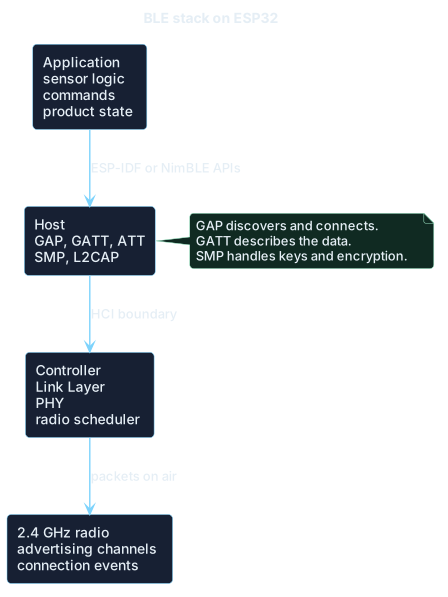
The BLE stack on ESP32 is split between application logic, host protocols, controller behavior, and radio activity.
BLE roles: GAP and GATT are two different things
One of the most common mistakes is confusing GAP roles with GATT roles.
GAP roles
GAP is about discovery, advertising, scanning, and connection.
| GAP role | Meaning |
|---|---|
| Advertiser | transmits advertising packets |
| Scanner | listens for advertising packets |
| Initiator | starts a connection |
| Peripheral | connected device that usually exposes data |
| Central | device that starts and manages the connection |
| Broadcaster | transmits data without a connection |
| Observer | listens to broadcast data without connecting |
Typical example: an ESP32 sensor is a peripheral, while the smartphone is a central.
GATT roles
GATT is about the data model.
| GATT role | Meaning |
|---|---|
| GATT Server | contains services, characteristics, and values |
| GATT Client | discovers, reads, writes, and subscribes to server data |
In most projects, an ESP32 is a GAP peripheral and a GATT server. The smartphone is a GAP central and a GATT client.
But this is not mandatory. An ESP32 can also work as a central and client, for example when it needs to read external BLE sensors. In some cases, GATT server and GATT client can also coexist.
Advertising: how an ESP32 makes itself discoverable
Advertising is the mechanism a BLE device uses to announce its presence.
An ESP32 can transmit advertising packets to say:
- I am available;
- I expose this service;
- this is my name;
- these are some minimal data;
- I can accept a connection.
Advertising can serve two purposes:
- making the device discoverable by a central that will later connect;
- transmitting small amounts of data without a connection, as a beacon does.
In legacy advertising, space is very limited. Advertising data and scan response can contain up to 31 bytes each, including the length and type fields of the AD structures. The bytes actually available to the application are therefore fewer than 31 and must be planned carefully.
Advertising channels
BLE uses three main channels for advertising: 37, 38, and 39.
They are distributed across the 2.4 GHz band to reduce the probability that all of them are disturbed by Wi-Fi at the same time.
Advertising interval
The advertising interval defines how often the device sends an advertising event.
| Interval | Effect |
|---|---|
| 20-100 ms | very fast discovery, high consumption |
| 100-500 ms | good compromise |
| 500 ms - 2 s | suitable for many IoT devices |
| 2-10 s | low consumption, slow discovery |
In ESP-IDF, adv_int_min and adv_int_max are expressed in units of 0.625 ms. So a value of 160 corresponds to 100 ms.
The values in the table are indicative. The valid range and exact behavior depend on the advertising type: ordinary legacy advertising can reach an upper interval of 10.24 seconds, while high-duty directed advertising follows different rules.
Advertising types
| Type | Meaning |
|---|---|
| Connectable | the device accepts connections |
| Non-connectable | transmits data but does not accept connections |
| Scannable | can respond to scan requests |
| Non-scannable | does not send scan responses |
| Directed | advertising addressed to a specific peer |
| Undirected | generic advertising |
For an app-controlled sensor, connectable undirected advertising is often used. For a beacon, non-connectable advertising is used instead.
Advertising and privacy
Advertising is visible to anyone nearby. It must be treated as public.
Never put these in advertising data or scan response:
- passwords;
- tokens;
- medical data;
- unnecessary permanent serial numbers;
- the user's full name;
- easily traceable identifiers;
- sensitive device state;
- cloud information or credentials.
Using private addresses is useful, but it is not enough if the advertising payload always contains the same identifier. A device using RPA but transmitting fixed manufacturer data can still be tracked.
Scanning: how ESP32 finds nearby BLE devices
Scanning is the procedure a device uses to listen for advertising packets transmitted by other devices.
The main parameters are:
| Parameter | Meaning |
|---|---|
| Scan interval | how often scanning starts |
| Scan window | how long the device stays listening |
| Scan type | passive or active |
| Filter policy | accept all devices or only filtered devices |
If scan window is equal to scan interval, the scanner listens almost continuously. It is fast, but it consumes a lot. If the window is small compared to the interval, consumption goes down, but the time required to discover devices increases.
In legacy BLE, both parameters use 0.625 ms units, and the scan window cannot exceed the scan interval. Even at a theoretical 100% duty cycle, stack scheduling and radio coexistence can still introduce short gaps.
In ESP-IDF, functions such as esp_ble_gap_set_scan_params() and esp_ble_gap_start_scanning() are used. A duration of 0 means continuous scanning until it is explicitly stopped.
Passive scanning
In passive scanning, ESP32 only listens. It receives advertising packets but does not request additional data.
Advantages:
- lower consumption;
- less radio traffic;
- more discreet behavior.
Limitation:
- it only sees what is contained in the advertising packet.
Active scanning
In active scanning, ESP32 sends a scan request to a scannable advertiser. The device can then respond with a scan response.
Advantages:
- allows reading additional data;
- useful for complete names, extra UUIDs, or larger manufacturer data.
Disadvantages:
- consumes more;
- creates more radio traffic;
- reveals the presence of the scanner.
BLE connection: connection event, interval, latency, and timeout
When a central connects to a peripheral, communication does not become continuous. The two devices synchronize and communicate during periodic windows called connection events.
Connection interval
The connection interval is the time between two connection events.
The lower it is, the more responsive the communication becomes. But consumption increases.
On a traditional LE connection, it uses 1.25 ms units and can range from 7.5 ms to 4 seconds. The central selects the final parameters: the peripheral can propose preferred values, but it cannot assume they will be accepted exactly.
| Use case | Indicative connection interval |
|---|---|
| remote control or fast input | 7.5-30 ms |
| sensor with frequent updates | 30-100 ms |
| app-based configuration | 30-200 ms |
| low-power sensor | 250 ms - 1 s or more |
Peripheral latency
Peripheral latency allows the peripheral to skip some connection events when it has no data to send.
Example:
- connection interval: 30 ms;
- latency: 9.
The peripheral can skip up to 9 events. In practice, it can wake up roughly every 300 ms if it has no data, saving energy without losing the connection.
That is a possibility, not a guaranteed period. Pending traffic, control procedures, or requests from the central can require the peripheral to participate sooner.
Supervision timeout
The supervision timeout is the maximum time without valid communication before the connection is considered lost.
In ESP-IDF, it is expressed in units of 10 ms. On traditional LE connections, the permitted range is 100 ms to 32 seconds, and the value must satisfy the constraint defined by the specification:
supervision_timeout > 2 * (1 + peripheral_latency) * connection_intervalWith newer features such as connection subrating, the subrate factor also enters the formula. For a conventional ESP32 project, however, the relation above is the essential check.
Practical rule: do not set it too low, or you may get random disconnections. Do not set it too high either, or the system will take too long to detect that the peer has disappeared.
GATT: services, characteristics, descriptors, and attributes
GATT is the BLE data model.
You do not send random bytes. A device exposes an attribute table organized into services, characteristics, and descriptors.
Attribute
An attribute is the basic unit of ATT/GATT.
It has these elements:
| Field | Meaning |
|---|---|
| Handle | numeric identifier of the attribute |
| UUID | type of the attribute |
| Permissions | access rules |
| Value | contained value |
| Length | value size |
The handle allows the client to refer precisely to that attribute.
Service
A service represents a logical function.
Examples:
| Service | Use |
|---|---|
| Battery Service | battery level |
| Heart Rate Service | heart rate |
| Device Information Service | device information |
| Environmental Sensing | temperature, humidity, pressure |
| Custom service | proprietary functions |
A service can be primary or secondary. Primary services are the main ones discovered by the client. Secondary services are auxiliary and are used by other services.
Characteristic
A characteristic represents a value or a command.
Examples:
| Characteristic | Typical direction |
|---|---|
| Temperature | ESP32 -> smartphone |
| LED status | ESP32 -> smartphone |
| LED command | smartphone -> ESP32 |
| Wi-Fi configuration | smartphone -> ESP32 |
| Battery level | ESP32 -> smartphone |
| Sensor data stream | ESP32 -> gateway |
A characteristic is not just a value. In GATT, it is made of multiple attributes:
- Characteristic Declaration, with properties and the value handle.
- Characteristic Value, with UUID and actual value.
- optional descriptors, such as the CCCD.
Descriptor
A descriptor adds metadata to a characteristic.
| Descriptor | UUID | Use |
|---|---|---|
| CCCD | 0x2902 | enables notify/indicate |
| Characteristic User Description | 0x2901 | human-readable description |
| Presentation Format | 0x2904 | format and unit |
| Valid Range | 0x2906 | valid range of the value |
The most important descriptor is the CCCD, Client Characteristic Configuration Descriptor.
When a characteristic supports notifications or indications, the client must write to the CCCD to enable or disable them. Without a correctly configured CCCD, notify and indicate often do not work as expected.
Properties and permissions: an important distinction
In GATT there are two different concepts: properties and permissions.
Characteristic properties
Properties say what a characteristic can do.
| Property | Meaning |
|---|---|
| Read | can be read |
| Write | can be written |
| Write Without Response | can receive writes without response |
| Notify | can send notifications |
| Indicate | can send indications |
| Broadcast | can be used in GATT broadcast |
| Extended Properties | uses extended properties |
Properties are visible to the client during discovery. They say: this characteristic supports these operations.
Attribute permissions
Permissions say who can access the attribute and with what security level.
| Permission | Meaning |
|---|---|
| Read | readable without encryption |
| Write | writable without encryption |
| Read Encrypted | readable only with encrypted link |
| Write Encrypted | writable only with encrypted link |
| Read MITM | readable only with MITM protection |
| Write MITM | writable only with MITM protection |
| Signed Write | signed write |
In Bluedroid, ESP-IDF uses flags such as:
ESP_GATT_PERM_READ;ESP_GATT_PERM_READ_ENCRYPTED;ESP_GATT_PERM_READ_ENC_MITM;ESP_GATT_PERM_WRITE;ESP_GATT_PERM_WRITE_ENCRYPTED;ESP_GATT_PERM_WRITE_ENC_MITM.
This distinction is fundamental.
A characteristic can have the WRITE property but the WRITE_ENC_MITM permission.
This means:
- the client sees that the characteristic is writable;
- if it tries to write without an encrypted and authenticated link, the stack rejects it or requires pairing;
- the write is accepted only after suitable encryption and authentication.
GATT operations: read, write, notify, indicate
The main operations are five.
Read
The client reads the value of a characteristic.
Typical use:
- temperature;
- battery level;
- firmware version;
- current configuration.
Read is simple, but it is not ideal for data that changes often. In that case, the client would need to constantly poll the server.
Write
The client writes a value and the server responds.
Typical use:
- turning an LED on or off;
- setting a threshold;
- sending a configuration;
- changing device mode.
Write expects an ATT response, so the client knows whether the server accepted the procedure. The response does not prove that a physical action has completed: a motor command or persistent update may still need a separate application-level acknowledgement.
Write Without Response
The client writes without waiting for a GATT response.
Typical use:
- data streams;
- fast packets;
- application protocols that handle ACK at a higher level.
It reduces overhead, but it produces no ATT response. The Link Layer still handles radio retransmissions on the connection; buffers, congestion, and an application-level acknowledgement must still be managed when end-to-end confirmation matters.
Notify
The server sends data to the client without GATT confirmation.
Typical use:
- sensor updates;
- logs;
- data streams;
- periodic status.
Notifications avoid continuous polling and are widely used when data changes over time.
Indicate
The server sends data to the client and the client must confirm it.
Typical use:
- important events;
- alarms;
- critical state changes;
- messages that should not be lost.
Indications are confirmed at ATT/GATT level, but they are not cryptographically more secure than notifications. They are slower, and only one indication can remain outstanding on a given ATT bearer until confirmation arrives.
Service discovery and GATT cache
When a client connects to a GATT server, it must discover which services, characteristics, and descriptors exist. This process is called service discovery.
The client retrieves:
- start and end handles of services;
- service UUIDs;
- available characteristics;
- properties;
- descriptors;
- value handles.
Many operating systems, especially smartphones, cache the GATT table. This can create confusion during development.
If you change UUIDs, handles, or server structure, the phone may continue to see the old structure.
Good practices:
- do not constantly change the GATT layout;
- keep UUIDs stable;
- keep handles stable when possible;
- use Service Changed indication if the database changes;
- during development, remove bonding and cache from the phone if services look outdated.
The Service Changed characteristic belongs to the Generic Attribute Service. ESP-IDF includes APIs for sending its indication from the GATT server, but client behavior still varies. Version the database deliberately and test firmware updates, rebonding, and rediscovery rather than treating the indication as a universal cache reset.
MTU, useful payload, and fragmentation
The ATT MTU defines the maximum size of an ATT packet on the negotiated bearer.
The initial value is 23 bytes. For a notification, the common payload limit is MTU - 3: 20 bytes at MTU 23. That shortcut does not apply unchanged to every ATT procedure, because different opcodes have different overhead.
With ESP-IDF Bluedroid, the local maximum can be configured up to 517 bytes, but the effective MTU is negotiated between the peers and is limited by the smaller value. NimBLE exposes the same concept through different configuration and APIs.
MTU does not automatically mean throughput
Increasing MTU helps, but it is not enough.
Throughput also depends on:
- connection interval;
- Data Length Extension;
- number of packets per connection event;
- PHY;
- radio quality;
- congestion;
- BLE stack;
- smartphone or peer used;
- application logic.
MTU in ESP-IDF
In the Bluedroid client, esp_ble_gattc_send_mtu_req() starts the MTU exchange and later generates ESP_GATTC_CFG_MTU_EVT.
The local limit can be set with esp_ble_gatt_set_local_mtu(). That call alone does not force the peer to adopt the value; without a successful exchange, the connection starts with MTU 23.
Practical values
| MTU | Typical notification payload | Use |
|---|---|---|
| 23 | 20 bytes | maximum compatibility |
| 100 | 97 bytes | good compromise |
| 247 | 244 bytes | widely used for throughput |
| 517 | up to 512 bytes of GATT value | maximum ATT MTU, only if the peer supports it |
Not all smartphones accept 517. In practice, values such as 185, 247, or similar are often more realistic.
MTU 247 is particularly convenient with DLE because a full ATT packet fits inside one 251-byte Link Layer payload once the 4-byte L2CAP header is included. MTU 517 necessarily spans multiple Link Layer packets.
Data Length Extension, PHY, and throughput
Data Length Extension, or DLE, is different from MTU.
MTU belongs to ATT/GATT. DLE belongs to the Link Layer packet size.
On an LE connection, DLE can raise the Link Layer data payload from the legacy 27 bytes to 251 bytes. ESP32 supports Bluetooth 4.2 DLE and exposes APIs such as esp_ble_gap_set_pkt_data_len(). Increasing MTU without increasing the data length still works, but the ATT packet is fragmented across more Link Layer packets.
| Concept | Layer | What it controls |
|---|---|---|
| MTU | ATT/GATT | GATT operation size |
| DLE | Link Layer | radio data packet size |
| PHY | physical | radio speed/modulation |
| Connection interval | link scheduling | event frequency |
| Notification/write mode | GATT | overhead and confirmations |
Realistic throughput
BLE throughput on ESP32 depends on interference, connection interval, MTU, DLE, and peer performance.
Espressif reports up to roughly 700 Kbit/s between two ESP32 boards under favorable conditions. On targets with 2M PHY, its reference measurements reach about 1.4 Mbit/s. These are benchmark results, not product guarantees: interference, the peer, the stack, and coexistence can lower the result substantially.
Available PHYs
| PHY | Characteristic |
|---|---|
| LE 1M | maximum compatibility |
| LE 2M | higher speed, if supported |
| LE Coded | longer range; nominal 500 or 125 Kbit/s |
The current ESP-IDF feature matrices make the target distinction explicit:
| Target | DLE | Secure Connections | 2M PHY | Coded PHY | Extended advertising |
|---|---|---|---|---|---|
| original ESP32 | yes | yes | no | no | no |
| ESP32-C3 | yes | yes | yes | yes | yes |
| ESP32-S3 | yes | yes | yes | yes | yes |
| ESP32-C6 | yes | yes | yes | yes | yes |
This table reflects the current stable documentation. Before committing to a feature, verify the selected controller, host stack, and ESP-IDF release, because support status and experimental qualifications can change.
On a compatible target, Coded PHY keeps the radio occupied longer than 1M or 2M PHY and can reduce performance when Wi-Fi and Bluetooth share the same band.
BLE security: what it actually protects
BLE security is not automatic.
A connection can be:
- completely open;
- encrypted but not authenticated;
- encrypted and authenticated;
- protected against man-in-the-middle attacks.
The protocol that handles this part is SMP, Security Manager Protocol. SMP manages pairing, bonding, key distribution, encryption, and identity.
Pairing, bonding, encryption
These three terms are often confused.
| Term | Meaning |
|---|---|
| Pairing | generation and authentication of keys |
| Bonding | saving keys for future connections |
| Encryption | encrypting the BLE link using valid keys |
Pairing can generate keys. Bonding saves those keys. Encryption uses those keys to protect the link.
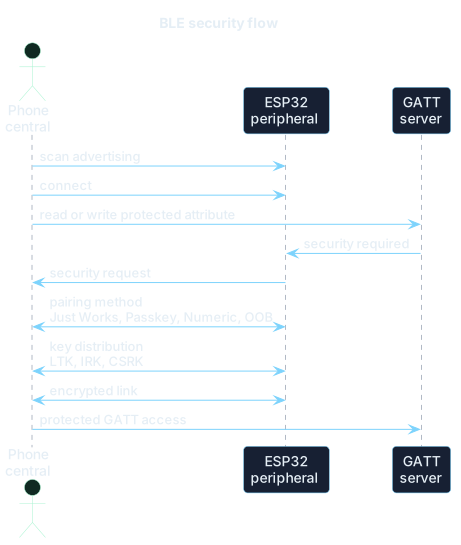
A protected GATT operation normally forces the connection through pairing, key distribution, and link encryption before access is granted.
Pairing does not always mean strong security
Pairing does not provide the same guarantees with every association method.
| Method | MITM protection | Notes |
|---|---|---|
| Legacy Just Works | no | encryption without peer authentication |
| Legacy Passkey Entry | yes | authenticated, but based on the limited-entropy legacy TK |
| Secure Connections Just Works | no | ECDH and encryption, but no peer authentication |
| SC Passkey/Numeric Comparison | yes | ECDH plus MITM protection when user interaction is trusted |
| Secure Connections OOB | depends | strength depends on the security of the external channel |
MITM means Man-In-The-Middle. Without MITM protection, a nearby attacker could intercept the pairing process in some scenarios.
Security Mode 1
BLE Security Mode 1 has four main levels.
| Level | Meaning |
|---|---|
| Level 1 | no security |
| Level 2 | encryption with unauthenticated pairing |
| Level 3 | encryption with authenticated pairing |
| Level 4 | authenticated LE Secure Connections with a 128-bit key |
Every connection starts from the lowest level and can be upgraded depending on the pairing method used.
LE Legacy Pairing and LE Secure Connections
BLE initially used LE Legacy Pairing, based on Temporary Key and Short Term Key.
Bluetooth 4.2 introduced LE Secure Connections, which protects key establishment with Elliptic-Curve Diffie-Hellman.
On real products, Secure Connections should be used whenever possible, especially to avoid the weaknesses of legacy pairing. The MITM bit alone does not create an authentication method: the I/O capabilities of both peers determine whether Passkey Entry or Numeric Comparison can actually be used.
Numeric Comparison exists only with LE Secure Connections and requires both a way to display the number and a trustworthy user confirmation. A static passkey can be practical, but it becomes a reused secret; for sensitive products, an ephemeral passkey, Numeric Comparison, or a protected OOB channel is usually preferable.
Security on ESP32: important APIs and parameters
In ESP-IDF Bluedroid, BLE security is configured mainly through GAP/SMP.
Main APIs
| API | Use |
|---|---|
esp_ble_gap_set_security_param() | sets SMP parameters |
esp_ble_set_encryption() | requests encryption on the link |
esp_ble_gap_security_rsp() | accepts or rejects a security request |
esp_ble_passkey_reply() | replies with passkey |
esp_ble_confirm_reply() | confirms numeric comparison |
esp_ble_remove_bond_device() | removes a bonded device |
esp_ble_get_bond_device_num() | counts bonded devices |
esp_ble_gap_get_local_irk() | gets local IRK |
Important SMP parameters
| Parameter | Meaning |
|---|---|
ESP_BLE_SM_AUTHEN_REQ_MODE | authentication requirements |
ESP_BLE_SM_IOCAP_MODE | input/output capabilities |
ESP_BLE_SM_SET_INIT_KEY | keys distributed by the initiator |
ESP_BLE_SM_SET_RSP_KEY | keys distributed by the responder |
ESP_BLE_SM_MAX_KEY_SIZE | maximum key size |
ESP_BLE_SM_MIN_KEY_SIZE | minimum key size |
ESP_BLE_SM_SET_STATIC_PASSKEY | static passkey |
ESP_BLE_SM_ONLY_ACCEPT_SPECIFIED_SEC_AUTH | accepts only specified requirements |
ESP_BLE_SM_OOB_SUPPORT | Out-of-Band support |
To accept only Secure Connections, use the ESP_LE_AUTH_REQ_SC_ONLY bit in ESP_BLE_SM_AUTHEN_REQ_MODE and enable ESP_BLE_ONLY_ACCEPT_SPECIFIED_AUTH_ENABLE through ESP_BLE_SM_ONLY_ACCEPT_SPECIFIED_SEC_AUTH.
If bonding and MITM protection are required, ESP_LE_AUTH_BOND and ESP_LE_AUTH_REQ_MITM should also be added.
Security events to handle
In the GAP callback, events such as these must be handled:
| Event | Meaning |
|---|---|
ESP_GAP_BLE_SEC_REQ_EVT | the peer requests security |
ESP_GAP_BLE_PASSKEY_NOTIF_EVT | show passkey |
ESP_GAP_BLE_NC_REQ_EVT | numeric comparison |
ESP_GAP_BLE_KEY_EVT | key exchange |
ESP_GAP_BLE_AUTH_CMPL_EVT | authentication completed |
ESP_GAP_BLE_REMOVE_BOND_DEV_COMPLETE_EVT | bond removed |
ESP_GAP_BLE_SET_LOCAL_PRIVACY_COMPLETE_EVT | local privacy configured |
Espressif's gatt_security_server example is a good starting point because it shows passkey, numeric comparison, security request, key exchange, authentication complete, and local privacy.
BLE privacy: addresses, tracking, and IRK
BLE privacy is used to reduce the possibility of tracking a device over time through its radio address.
BLE address types
| Type | Description |
|---|---|
| Public Device Address | public address assigned to the device |
| Random Static Address | random but stable address until changed |
| Resolvable Private Address, RPA | address that changes and can be resolved by authorized peers |
| Non-Resolvable Private Address, NRPA | random non-resolvable address |
A bonded device can resolve an RPA using the IRK, Identity Resolving Key.
IRK
IRK means Identity Resolving Key.
It can be exchanged during pairing and stored as part of the bond when identity-key distribution is enabled. It is then used to recognize a device even when that device changes its RPA.
In practice:
- the device periodically changes address;
- the bonded peer receives the new address;
- it uses the saved IRK to understand that it is the same device;
- an unauthorized observer should not be able to make this association.
RPA is not enough if the payload identifies the device
Wrong example:
Address: changes every 15 minutesAdvertising name: "Marco_Glucometer_SN123456"Manufacturer data: fixed ID 0xA1B2C3D4The address changes, but the device is still recognizable.
Better example:
Address: RPAAdvertising name: generic or absentManufacturer data: no permanent IDConnection: sensitive data only after encryptionBLE privacy must be designed around the whole packet, not only around the address.
BLE encryption: what is encrypted and what is not
BLE encryption protects the link after the devices have established valid keys.
Advertising is not a secret channel
In normal cases, advertising and scan response must be considered public.
| Data | Where to put it |
|---|---|
| generic device name | advertising, if needed |
| service UUID | advertising |
| non-sensitive state | advertising, if acceptable |
| Wi-Fi password | never in advertising |
| cloud token | only after secure connection |
| personal data | only after encryption and access control |
| critical commands | protected characteristic |
Encryption protects connection data, not normal legacy advertising packets.
Encryption does not replace application checks
Even with an encrypted link, you still need to:
- check who can write a characteristic;
- validate lengths and formats;
- avoid overflows;
- use timeouts;
- avoid trusting received values blindly;
- distinguish pairing mode from operating mode;
- protect critical commands with application logic.
Encrypted GATT permissions
To protect a characteristic, permissions must be configured.
| Characteristic | Property | Permission |
|---|---|---|
| public temperature | Read/Notify | Read |
| threshold configuration | Read/Write | Read Encrypted / Write Encrypted |
| lock command | Write | Write Encrypted + MITM |
| cloud token | Write | Write Encrypted + MITM |
| medical data | Read/Notify | Read Encrypted + MITM |
On ESP-IDF Bluedroid, the flags ESP_GATT_PERM_READ_ENCRYPTED, ESP_GATT_PERM_WRITE_ENCRYPTED, ESP_GATT_PERM_READ_ENC_MITM, and ESP_GATT_PERM_WRITE_ENC_MITM are used to define these requirements.
One detail is easy to miss: a protected read permission does not automatically protect notifications, because the server initiates them. Before sending a notification or indication, the firmware should verify the current link security and ensure that access to the CCCD is protected consistently.
Filter Accept List and pairing mode
In a real product, it is not a good idea to remain in pairing mode all the time.
A more robust strategy is:
- during normal startup, accept only already bonded devices;
- enter pairing mode only through a local action;
- keep pairing mode active for a limited time;
- save the bond after pairing;
- use a Filter Accept List or application logic to limit connections and scan requests;
- allow pairing reset only through a controlled procedure.
A Filter Accept List is a controller-level filter, not application authorization. It does not replace authenticated pairing, GATT permissions, or firmware checks. When peers use RPAs, it must also be designed together with the resolving list and the chosen privacy configuration.
Why a physical action matters
Without a physical action, anyone near the device could attempt pairing whenever the device is available.
A local button reduces the risk because it requires physical presence.
Example:
- press button for 5 seconds;
- LED starts blinking;
- connectable advertising opens for 60 seconds;
- pairing with passkey or numeric comparison;
- bond is saved;
- pairing mode exits automatically.
Designing a secure ESP32 GATT server
A good GATT server does not expose everything without control.
You need to separate:
- public data;
- protected data;
- critical commands;
- functions available only during provisioning;
- functions available only with physical confirmation.
Example custom service: Device Control Service.
| Characteristic | Operations | Security |
|---|---|---|
| Device Status | Read/Notify | encrypted link and protected CCCD |
| Device Name | Read/Write | Write encrypted |
| Factory Reset | Write | Write encrypted + MITM + physical confirmation |
| Firmware Version | Read | public or encrypted |
| Diagnostic Log | Notify | encrypted link and protected CCCD |
| Wi-Fi Credentials | Write | encrypted + MITM, only in provisioning mode |
For credentials and factory-reset commands, link security is only the first layer. Tie provisioning to a physical window, verify the authenticated state before processing the write, and erase temporary copies of secrets from memory as soon as they are no longer needed.
Custom UUIDs are not passwords
A 128-bit UUID is not a secret.
A client can perform service discovery and find services and characteristics. Security should not be designed around the idea that "nobody knows the UUID".
Security must be based on:
- correct pairing;
- encryption;
- MITM when needed;
- GATT permissions;
- application checks;
- limited pairing mode;
- no secrets in advertising.
Always validate writes
Every write must be checked.
At minimum:
- length;
- format;
- value range;
- current device state;
- authorization;
- rate limit;
- checksum or framing, if needed;
- replay protection, if the command is critical.
For example, a characteristic receiving a motor command should not accept any random byte. It must check command, parameters, security state, operating mode, and timeout.
Application privacy: beyond the BLE standard
Privacy is not only about the radio address.
It is about everything that can identify a user, a device, or a behavior.
Data to minimize
Avoid exposing:
- real user name;
- email;
- fixed serial number;
- location;
- Wi-Fi MAC;
- SSIDs of known networks;
- medical data;
- usage patterns;
- permanent cloud identifiers.
Temporary identifiers
If you need to transmit an identifier in advertising, consider temporary identifiers:
- generated by the server;
- rotated periodically;
- not directly linked to the user;
- valid only for a time window;
- useless without backend or key.
Data exposure phases
A good model can look like this:
| Phase | Exposed data |
|---|---|
| Advertising | minimal data only |
| Unencrypted connection | almost nothing |
| After pairing/encryption | configuration and status |
| After application authentication | very sensitive data |
| Maintenance mode | only with physical action |
Power consumption: what really matters
BLE consumes little only if it is configured correctly.
Parameters that increase consumption include:
| Parameter | Effect |
|---|---|
| very low advertising interval | radio active more often |
| continuous scanning | very high consumption |
| low connection interval | frequent events |
| peripheral latency zero | peripheral always present |
| high TX power | higher consumption |
| notifications too frequent | more traffic |
| heavy logs and callbacks | CPU active for longer |
Indicative configurations
| Scenario | Advertising | Connection interval | Latency | Notes |
|---|---|---|---|---|
| fast pairing | 20-100 ms | 30-50 ms | 0 | only for a short window |
| battery sensor | 1-5 s | 250 ms - 1 s | high | maximum saving |
| beacon | 500 ms - 5 s | no connection | not used | non-connectable |
| streaming | 100-500 ms | 7.5-30 ms | 0 | high throughput |
| configuration app | 100-500 ms | 30-100 ms | 0-4 | good compromise |
There is no absolute best value, and the central can negotiate parameters different from those preferred by the peripheral. Treat the table as a set of starting points, then measure current, latency, and stability on the actual product.
BLE and Wi-Fi together on ESP32
ESP32 uses the 2.4 GHz band for both Wi-Fi and Bluetooth. The two radios must coexist.
Common problems:
| Problem | Possible cause |
|---|---|
| BLE disconnections | very active Wi-Fi, low timeout |
| unstable BLE throughput | radio coexistence |
| scanning misses devices | small scan window or intense Wi-Fi |
| high latency | shared radio scheduling |
| high consumption | Wi-Fi and BLE always active |
Good practices:
- avoid continuous BLE scanning if Wi-Fi is heavily used;
- use realistic connection intervals;
- increase supervision timeout in noisy environments;
- reduce unnecessary logs and traffic;
- use BLE for provisioning and turn it off when no longer needed;
- on compatible targets, avoid Coded PHY unless long range is really required.
On a compatible target, Coded PHY can make coexistence worse because it keeps the radio busy for longer than 1M or 2M PHY.
Secure BLE server firmware flow on ESP32
A robust BLE server firmware can follow this flow:
- initialize NVS;
- initialize the Bluetooth controller;
- enable Bluedroid or NimBLE;
- configure a non-identifying device name;
- configure local privacy, if used;
- configure SMP parameters;
- create the GATT table;
- set correct permissions for each attribute;
- configure minimal advertising data;
- start advertising;
- on connection, update parameters if needed;
- request encryption if the service requires it;
- handle pairing and bonding;
- handle read, write, notify, and indicate;
- on disconnection, restart advertising if appropriate;
- exit pairing mode after timeout.
Pseudocode:
void app_main(void) { init_nvs(); init_ble_controller(); init_ble_host(); // NimBLE or Bluedroid configure_device_name("ESP32-Device"); configure_privacy_if_needed(); configure_smp_security(); create_gatt_database_with_secure_permissions(); configure_advertising_payload_minimal(); start_advertising(); // From here on: GAP/GATT callbacks}Keep callbacks light
BLE callbacks must be fast.
In practice:
- do not write to flash inside callbacks unless necessary;
- do not perform heavy parsing;
- do not run HTTP or MQTT directly;
- use queues and separate tasks;
- copy the data and return quickly.
A BLE callback should not become the place where all application logic lives.
ESP32 BLE client flow
An ESP32 can also work as a BLE client or gateway.
Typical flow:
- configure scanning;
- start scanning;
- filter by service UUID, name, or manufacturer data;
- stop scanning when the target is found;
- open the connection;
- perform MTU exchange;
- run service discovery;
- find characteristic and CCCD;
- read values or enable notifications;
- handle reconnection and cache.
Filter properly
Do not filter only by name. The name can change, be missing, or be non-unique.
Better options:
- service UUID;
- manufacturer data;
- address only if bonded and privacy is handled;
- non-sensitive application data;
- Filter Accept List, when applicable.
Common mistakes
- Putting secrets in advertising: advertising and scan response are visible. Do not use them for passwords, tokens, credentials, or personal data.
- Thinking Just Works protects against MITM: it can produce an encrypted link, but it does not authenticate the peer. It is not enough for sensitive commands.
- Confusing encryption and authorization: encryption protects the link; the stack and application still need to decide whether a command is allowed.
- Protecting reads but not notifications: an encrypted read permission blocks attribute reads, not transmissions initiated by the server. Check the link level and protect the CCCD.
- Using custom UUIDs as passwords: clients can discover UUIDs, so they are not secrets.
- Assuming MTU is always 517: the final MTU is negotiated, and the peer can choose a lower value.
- Forgetting the CCCD: notifications and indications require the client to enable the characteristic.
- Leaving pairing permanently open: pairing mode should be temporary and, ideally, activated through a physical action.
- Changing the GATT table without handling cache: use Service Changed and test updates, bonding, and rediscovery.
Checklist for an ESP32 BLE project
Architecture
- I chose NimBLE if I only need BLE.
- I chose Bluedroid if I also need Bluetooth Classic.
- I checked the features supported by the specific chip.
- I am not assuming newer BLE 5 features on the original ESP32.
Advertising
- Advertising data is below 31 bytes if using legacy advertising.
- No sensitive data is in advertising.
- The device name is generic.
- Advertising interval is coherent with power consumption and UX.
- Pairing advertising is time-limited.
Connection
- Connection interval is realistic.
- Peripheral latency is used if the device is battery-powered.
- Supervision timeout is not too aggressive.
- Parameters have been tested with real smartphones.
GATT
- Services and characteristics are organized logically.
- Custom 128-bit UUIDs are used for proprietary services.
- Properties and permissions are configured correctly.
- CCCD is present for notify/indicate.
- Writes are validated on the application side.
- Service Changed is handled if the GATT database changes.
Security
- SMP is configured.
- LE Secure Connections is used where possible.
- MITM is required for sensitive commands.
- Bonding is used for personal devices.
- Pairing mode can only be activated locally.
- Bond can be removed through a controlled procedure.
- Encrypted/MITM GATT permissions are used for sensitive data.
Privacy
- RPA is used if anti-tracking is needed.
- IRK is handled through bonding.
- Advertising does not contain permanent identifiers.
- Device name is not linked to the user.
- Sensitive data is sent only after encryption.
Performance
- MTU is negotiated and checked.
- DLE is enabled if throughput is needed.
- Notifications are used for streams.
- Indications are used only for critical events.
- Callbacks are light.
- Wi-Fi coexistence is tested.
Essential BLE glossary
- ACL: LE Asynchronous Connection logical transport. It carries Link Layer signaling, L2CAP, and asynchronous data between a connected central and peripheral.
- Advertising: periodic transmission of BLE packets to be discovered or to send small data.
- Advertising Data: payload contained in the advertising packet.
- Advertising Extension: BLE 5 feature that allows more flexible advertising and larger payloads compared to legacy advertising, if supported by the chip.
- Advertising Interval: time between two advertising events.
- ATT: Attribute Protocol. Defines attributes, handles, reads, writes, notifications, and indications.
- Attribute: basic data unit in ATT/GATT. It has handle, UUID, permissions, and value.
- Authentication: verification of the identity or legitimacy of the peer during pairing.
- Authorization: application-level or stack-level decision that determines whether a peer can access a resource.
- Bonding: saving the keys generated during pairing for future reconnections.
- Broadcaster: device that sends advertising without accepting connections.
- CCCD: Client Characteristic Configuration Descriptor. Descriptor UUID 0x2902 used by the client to enable notify or indicate.
- Central: GAP device that starts and manages the connection. Often a smartphone or gateway.
- Characteristic: GATT element that represents a value or a command.
- Characteristic Declaration: attribute that describes the properties and value handle of a characteristic.
- Characteristic Value: attribute that contains the actual value of the characteristic.
- Coded PHY: BLE PHY for long range. It uses redundant coding, increases range, but reduces throughput.
- Connection Event: time window in which central and peripheral exchange packets.
- Connection Interval: time between two connection events.
- CSRK: Connection Signature Resolving Key. Key used for data signing in some BLE scenarios.
- Data Length Extension, DLE: feature that increases payload size at Link Layer level.
- Descriptor: attribute that adds metadata to a characteristic.
- Encryption: encryption of the BLE link.
- Filter Accept List: list of devices accepted for scanning, advertising, or connection.
- GAP: Generic Access Profile. Manages discovery, advertising, scanning, roles, connection, and privacy.
- GATT: Generic Attribute Profile. Organizes attributes into services, characteristics, and descriptors.
- GATT Client: device that discovers, reads, writes, and subscribes to data from a GATT server.
- GATT Server: device that exposes an attribute table.
- Handle: numeric identifier of a GATT attribute.
- HCI: Host Controller Interface. Interface between Bluetooth host and controller.
- Indication: server-to-client message that requires confirmation.
- Initiator: GAP device that starts a connection.
- IRK: Identity Resolving Key. Key used to resolve Resolvable Private Addresses.
- Just Works: simple pairing method without MITM protection.
- LE Secure Connections: modern BLE pairing method based on ECDH, introduced with Bluetooth 4.2.
- L2CAP: adaptation and multiplexing layer between upper protocols and the BLE link.
- LTK: Long Term Key. Key used to encrypt future reconnections.
- MITM: Man-In-The-Middle. Attack where a third party sits between two devices.
- MTU: Maximum Transmission Unit. In ATT, it is the maximum packet size on the negotiated bearer.
- NimBLE: lightweight BLE stack available in ESP-IDF.
- Notification: server-to-client message without GATT confirmation.
- NRPA: Non-Resolvable Private Address. Non-resolvable private address.
- OOB: Out-of-Band. Pairing through an external channel, such as NFC or QR code.
- Pairing: process of generating and authenticating security keys.
- Passkey Entry: pairing method using a numeric code.
- Peripheral: GAP device that accepts a connection from a central.
- PHY: physical radio layer: LE 1M, LE 2M, LE Coded.
- Privacy: mechanisms used to reduce device tracking and identification.
- Properties: operations supported by a characteristic: read, write, notify, indicate.
- Permissions: access and security rules for GATT attributes.
- Resolvable Private Address, RPA: private address that changes and can be resolved by authorized peers through IRK.
- RSSI: Received Signal Strength Indicator. Indicator of received signal strength.
- Scan Request: request sent by an active scanner to a scannable advertiser.
- Scan Response: response containing additional data to advertising.
- Scanning: listening for advertising packets.
- Security Manager Protocol, SMP: BLE protocol for pairing, bonding, keys, and encryption.
- Service: GATT grouping of related characteristics.
- Service Changed Indication: indication used to inform the client that the GATT table has changed.
- Supervision Timeout: maximum time without valid communication before the connection is considered lost.
- UUID: identifier for services, characteristics, and descriptors. It can be a standard 16-bit UUID or a custom 128-bit UUID.
- Whitelist: older term often used to refer to Filter Accept List.
- Write Without Response: GATT write without a server response. Useful for throughput, but less controlled.
Conclusion
My conclusion is that BLE on ESP32 is difficult not because of the number of APIs, but because several layers must remain consistent. GAP determines how the device is discovered and connected; ATT and GATT define data and operations; SMP protects the link; the firmware must still decide whether a command is valid and authorized.
These are the choices I consider most important:
- verify the target, stack, and ESP-IDF version before relying on a feature;
- treat advertising and scan response as public data;
- keep properties, permissions, and application authorization separate;
- use Secure Connections and MITM protection when the risk requires them;
- open pairing only within a controlled window;
- negotiate MTU and connection parameters without assuming the peer will accept the proposed values;
- measure power consumption and throughput on the real product, especially with Wi-Fi active.
The best configuration is therefore not the one with the highest MTU or the shortest connection interval. It is the one that makes the trade-off between power, latency, compatibility, security, and privacy explicit. On the original ESP32, this also means accepting the controller's limits: DLE and Secure Connections are available, whereas 2M PHY, Coded PHY, and advertising extensions require a newer target.
In short, BLE provides an excellent set of mechanisms, but it does not define the product's policy by itself. A well-structured GATT database and an encrypted link are the starting point; reliability comes from what the firmware chooses to expose, accept, and record.
Main sources consulted
- ESP-IDF - Bluetooth LE overview for ESP32
- ESP-IDF - Bluetooth API, Bluedroid, and NimBLE
- ESP-IDF - BLE connection, MTU, and Data Length Extension
- ESP-IDF - Bluedroid GAP and security API
- ESP-IDF - Feature Support Status ESP32
- ESP-IDF - Feature Support Status ESP32-C3
- ESP-IDF - Feature Support Status ESP32-S3
- ESP-IDF - Feature Support Status ESP32-C6
- Espressif FAQ - Bluetooth LE and throughput
- Bluetooth Core Specification 6.1
Last updated
2026-05-19.
Article source content/blog/bluetooth_low_energy_esp32.