TrackOMatic · Android tracking, architecture, and cloud backend
I designed and developed a native Android application for recording outdoor activities, combining background location tracking, maps, statistics, authentication, and Firebase synchronization within a layered MVVM architecture. The project is complete and archived.
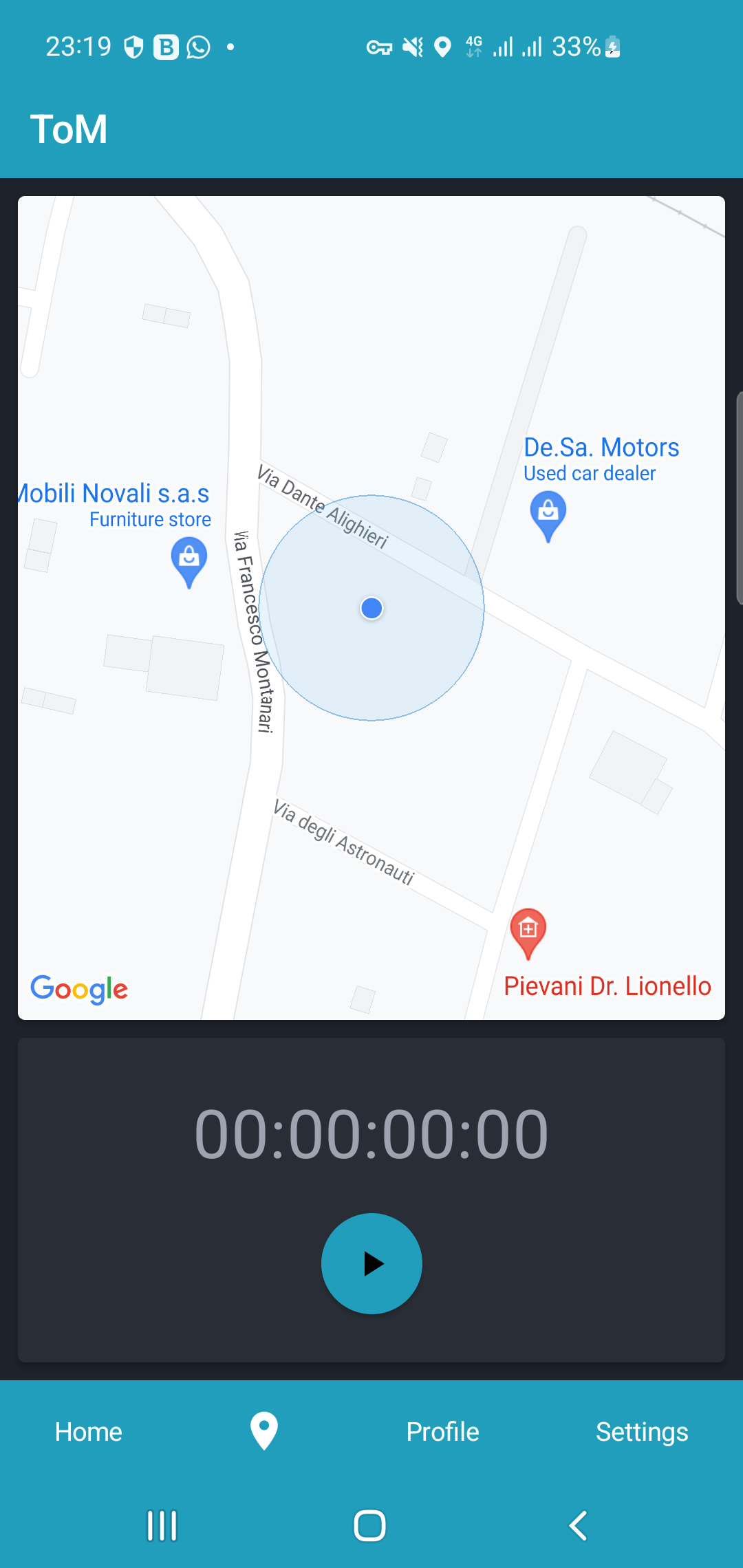
Building a familiar feature properly
I built TrackOMatic as a personal Android project to bring together problems that are often studied separately:
- interface design;
- layered application architecture;
- continuous geolocation;
- background execution;
- authentication;
- cloud persistence;
- reactive synchronization;
- complete user-data deletion.
The initial idea was straightforward: record an outdoor activity, display the route on a map, and present useful statistics when the session ended.
The difficult part was not inventing a new feature.
Applications for running, hiking, and cycling already existed. That was precisely what made the project useful: a familiar function leaves little room to hide technical problems behind the novelty of the concept.
Tracking had to continue when the application was no longer visible. The map needed to react to state without becoming the owner of that state. Sessions had to be stored, retrieved, and deleted together with their associated images. Authentication had to support email verification, password recovery, and Google access.
All of this needed to happen without turning every screen into a meeting point between permissions, Firebase, location services, navigation, and interface state.
TrackOMatic therefore became an exercise in balance.
I wanted enough structure to make the code understandable, but I did not want to introduce abstractions merely to satisfy an architecture diagram.
The public repository contains the source, project analysis, requirements, models, architecture, navigation structure, and descriptions of the main components.
The code is available at github.com/signorenne/trackomatic.

The product in brief
TrackOMatic records movement sessions such as running, jogging, and hiking, without enforcing one specific activity type.
During a session, the application presents:
- the current position;
- the route on the map;
- elapsed time;
- distance;
- tracking state;
- controls to start, pause, resume, or finish the session.
When the activity ends, the user can save it, discard it, or return to the active tracking flow. A saved session contains its duration, distance, average speed, estimated calories, timestamp, polyline, map configuration, image URI, and user and session identifiers.
The application also provides:
- registration and sign-in with email and password;
- Google One Tap sign-in;
- email verification;
- password recovery;
- activity history;
- individual session details;
- aggregate statistics;
- map-style customization;
- measurement-system selection;
- profile editing;
- sign-out;
- account and user-data deletion.
The repository describes TrackOMatic as a simplified but functional prototype of a modern tracking application. That definition reflects the real purpose of the project: not to compete with a mature commercial platform, but to build the complete technical path required to support its essential features.
Tracking is state, not a screen
One of the most important decisions was not treating tracking as a feature owned by the map screen.
The screen can present the route and allow the user to control the session. It should not own the session itself.
The application can move into the background, be covered by another activity, or temporarily lose the composition containing the map. Tracking still needs to continue until the user explicitly pauses or finishes it.
The system therefore distinguishes between the visible interface and the active tracking session, because they have different lifecycles.
This separation shaped the complete pipeline.
The UI observes state and sends commands.
The service and repository preserve the session independently of whether the tracking screen is currently visible.
The location pipeline
Location updates move through an explicit sequence:
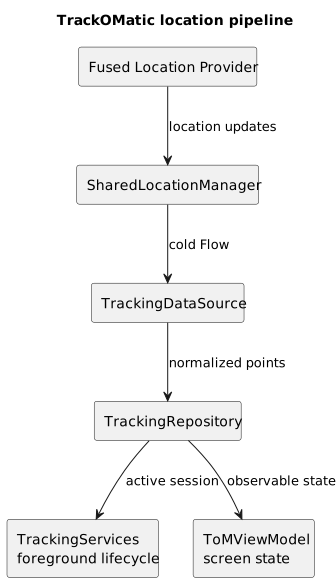
TrackOMatic location-data pipeline.
SharedLocationManager wraps the Fused Location Provider and converts location callbacks into a Flow.
TrackingDataSource keeps the active session data in memory.
TrackingRepository exposes the last position, complete route, tracking state, and elapsed time through observable flows.
TrackingServices consumes those updates in the background, while ToMViewModel exposes the information needed by the live interface. The repository documentation confirms that tracking state, elapsed milliseconds, and the complete coordinate list are represented through MutableStateFlow.
The pipeline separates two responsibilities:
- obtaining a new location;
- deciding whether that location belongs to the active session.
The provider may produce a new fix while tracking is paused. That position may still be useful as the current location, but it should not necessarily extend the polyline or increase the session distance.
That decision belongs to the session model, not to the location client.
SharedLocationManager and a cold Flow
SharedLocationManager uses Google Play Services' Fused Location Provider and exposes incoming locations through a cold Flow.
In the project, the provider operates in high-accuracy mode with request intervals between approximately two and five seconds. The documented non-functional requirements also aimed to provide a location at least every five seconds while minimizing power consumption.
Those objectives naturally compete.
More frequent updates create a smoother route and reduce the distance between points. They may also keep the location system active for longer and consume more energy.
Less frequent updates reduce work but can miss changes of direction and make the polyline less representative.
The chosen approach did not attempt to produce scientific-grade tracking.
It aimed for a useful compromise between accuracy, route readability, and energy consumption.
The Fused Location Provider is the main Google Play Services interface for retrieving device location. It supports continuous updates through requestLocationUpdates, while background use requires appropriate permissions or a foreground location service.
The tracking service
TrackingServices extends LifecycleService.
It observes the repository and, whenever the last location changes, checks the current tracking state. When that state is STARTED, the service appends the new point to the active session. It also updates the foreground notification through NotificationHelper.
In simplified form:
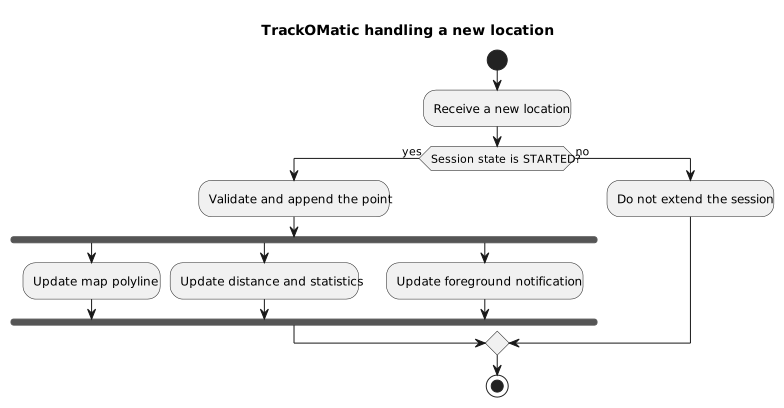
Decision and updates produced by a new TrackOMatic location.
The advantage is that the service does not need to understand how the tracking screen is composed.
Likewise, ToMScreen does not need to own the location lifecycle.
Both interact with the same tracking state through the repository, but their responsibilities remain different.
The foreground notification
During an active session, a notification keeps the tracking process visible in the system notification area.
This is not merely a technical mechanism.
It is also part of the user experience.
When an application continues using location outside its visible interface, the user should be able to understand that the operation is still active. The notification provides:
- visibility;
- confirmation that the session is continuing;
- a direct route back into the application;
- continuity while the app is in the background;
- an explicit indication that location is being used.
A foreground service also gives long-running location work a more appropriate execution model than ordinary background processing.
The implementation reflects Android requirements from the project's 2022–2023 period. A modern version would also need to declare a location foreground-service type and its associated permission. Apps targeting Android 14 or later must declare the service type and satisfy the corresponding location permission requirements when starting it.
The session lifecycle
A tracking session is not merely a collection of coordinates.
It has a lifecycle:
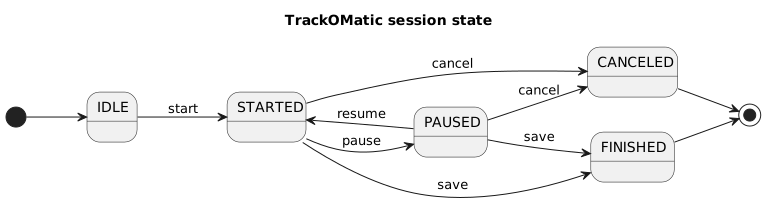
TrackOMatic session state machine.
Each state changes the product behavior:
- whether new positions are accepted;
- whether the timer advances;
- which controls are visible;
- whether the notification remains active;
- whether the session can be saved;
- whether temporary data should be discarded.
Representing these states explicitly avoids forcing the UI to infer behavior from combinations such as isRunning, hasStarted, and isPaused.
The repository becomes the shared source for:
- tracking state;
- current position;
- route;
- elapsed time;
- temporary session data.
An in-memory session before the cloud
During tracking, session data remains in memory.
Sending every location point directly to Firestore would have created several unnecessary problems:
- a large number of remote operations;
- dependency on network availability;
- more complex cancellation;
- partially persisted sessions;
- higher backend cost;
- more states to reconcile.
TrackingDataSource therefore keeps the active route and its associated information until the user finishes the activity. Only after the user chooses to save it does the app construct the persistent session and begin the Firebase flow.
The architecture distinguishes between the temporary session and the saved session.
A temporary session belongs to the tracking process.
A saved session belongs to the user's history and must satisfy persistence, synchronization, and deletion rules.
Statistics and their data sources
The Session model stores:
- average speed;
- distance;
- elapsed time;
- estimated calories;
- polyline;
- timestamp;
- map configuration;
- image URI;
- session ID;
- user ID.
The profile contains age, gender, height, and weight. The settings model stores map configuration and the preferred measurement system.
This separation distinguishes:
- values produced by an activity;
- personal data used by calculations;
- display preferences.
Changing the map style should not affect the meaning of the distance.
Similarly, changing the user's weight should not silently rewrite historical sessions without an explicit product decision.
The project does not attempt to solve every possible problem around versioned calculations, but it establishes that sessions, profiles, and settings have different responsibilities and lifecycles.
MVVM and Clean Architecture
The application is organized around three layers:
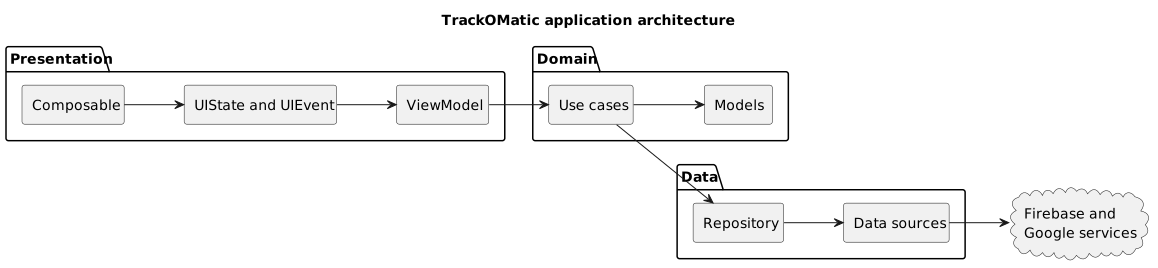
TrackOMatic layered application architecture.
The direction describes which layer can depend on the next.
Presentation
Contains:
- Compose screens;
- ViewModels;
- UI state;
- UI events;
- navigation;
- presentation-level validation.
Domain
Contains:
- models;
- use cases;
- validators;
- adapters;
- the common response representation.
Data
Contains:
- repositories;
- Firebase implementations;
- the tracking data source;
- the location manager;
- services;
- remote operations.
The repository describes use cases as the interface between ViewModels and repositories. Each main screen owns its own ViewModel, state, and event definitions.
The purpose was not simply to distribute files across directories.
It was to make one question explicit:
Which component owns this decision?
A screen owns visual composition.
A ViewModel owns the state required by the screen.
A use case describes an operation.
A repository determines how the data is obtained or changed.
Response<T>
Asynchronous operations use a common sealed representation:
sealed class Response<out T> { object Loading : Response<Nothing>() data class Success<out T>( val data: T? ) : Response<T>() data class Failure( val e: Exception ) : Response<Nothing>()}The wrapper represents:
- work in progress;
- a result;
- a failure.
It allows ViewModels to transform responses from different repositories into a consistent model for the interface. Whether the repository is communicating with Authentication, Firestore, or Storage, the screen receives the same high-level states.
The design is simple and has limitations.
Failure exposes an exception directly, leaving the presentation layer responsible for converting it into a useful message. Success<T?> also permits nullable data and may require additional checking.
For the scope of the project, however, it supplied a shared language for loading, completion, and failure without requiring every asynchronous operation to invent its own wrapper.
UI events and state
Each screen defines the events it can produce.
A registration screen, for example, can emit events for:
- username changes;
- email changes;
- password changes;
- focus changes;
- terms acceptance;
- registration confirmation.
The ViewModel receives those events, validates the inputs, and updates the corresponding UI state.

TrackOMatic unidirectional UI event and state flow.
This reduces the number of unrelated functions exposed by each ViewModel and makes the accepted interaction surface explicit. The repository documents this pattern with sealed event classes such as SignUpUIEvent and screen-specific state models.
The ToMViewModel exception
The architecture is not applied mechanically.
ToMViewModel is the only ViewModel that accesses TrackingRepository directly instead of retrieving all tracking values through separate use cases.
That decision is documented explicitly in the repository. The ViewModel directly observes:
- tracking state;
- last location;
- complete route;
- elapsed time.
It still uses domain use cases for the user profile, settings, session saving, and image upload.
From a purely formal perspective, this is an inconsistency.
From the perspective of the project, it is an intentional compromise.
The live screen consumes several closely related, frequently changing flows from the same repository. Introducing a dedicated use case for every StateFlow would have created more classes without adding a meaningful domain decision.
The useful rule was therefore not:
Every repository must always be hidden behind a use case.
It was:
An additional layer should exist when it clarifies a responsibility.
Clean Architecture remained a tool.
It did not become the purpose of the application.
Navigation by responsibility
Navigation is divided into four graphs:
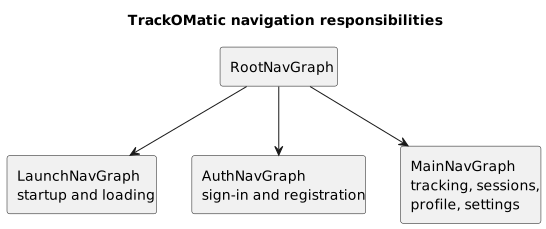
Responsibilities of the TrackOMatic navigation graphs.
LaunchNavGraph handles startup and leads to InitScreen.
AuthNavGraph contains:
SignInScreen;SignUpScreen;RestoreScreen;VerifyScreen.
MainNavGraph contains:
HomeScreen;ToMScreen;ProfileScreen;SettingsScreen.
RootNavGraph composes the other graphs, while MainActivity remains a thin host responsible primarily for creating the navigation graph.
The project therefore contains nine main screens:
InitScreen;SignInScreen;SignUpScreen;RestoreScreen;VerifyScreen;HomeScreen;ToMScreen;ProfileScreen;SettingsScreen.
Additional dialogs and structural components include SaveDialog, PermissionDialog, StatisticsDialog, EditProfileDialog, and the main bottom navigation.
Separating bootstrap, authentication, and the main application prevents all routes from being placed inside one undifferentiated graph.
Jetpack Compose
The interface is built entirely with Jetpack Compose.
The project uses Compose 1.3.3, Navigation Compose, Maps Compose, Coil, Accompanist, Lottie, a color picker, and a Compose screenshot library. It targets SDK 33, supports devices from API 21, and was built with Kotlin 1.8.0.
Compose fit the reactive structure of the application:
Repositories, Flow, and StateFlow feed the ViewModel, which produces the UIState rendered by Composables. This path is included in the application architecture shown earlier.
The screen does not repeatedly ask whether the data has changed.
It observes state and recomposes when that state changes.
This is particularly useful on the tracking screen, where location, route, elapsed time, and control state evolve continuously.
The main screens
InitScreen
Acts as the entry point.
It checks the current user state and routes toward authentication or the main application.
SignInScreen
Handles email, password, and Google One Tap authentication.
SignUpScreen
Handles registration, input validation, and acceptance of the terms.
RestoreScreen
Starts the password-recovery process.
VerifyScreen
Restricts access to the main application until an email-and-password account has been verified.
HomeScreen
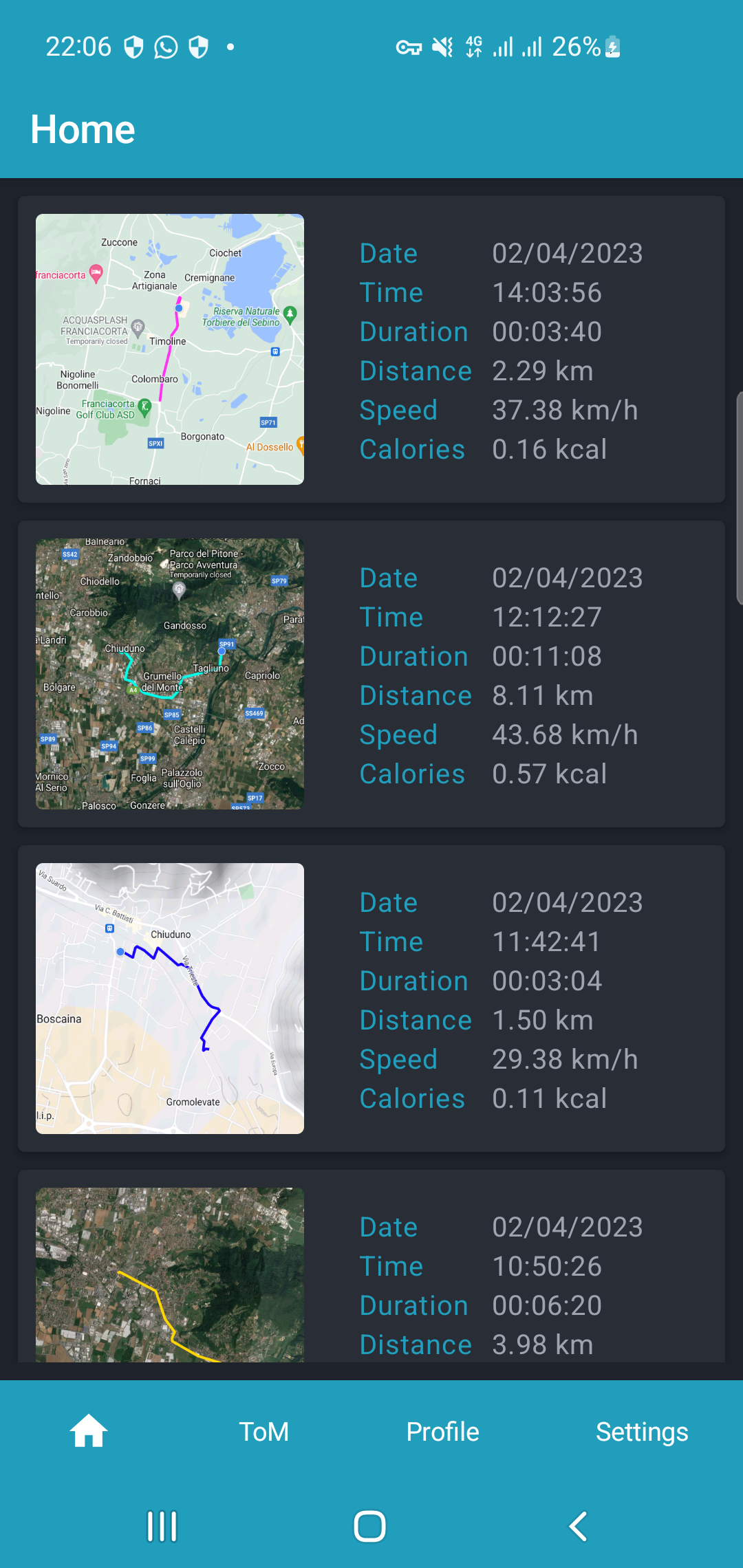
Displays the saved-session history and its route thumbnails. Selecting a session opens StatisticsDialog, where the activity can be reviewed or deleted.
ToMScreen
Provides the live map, current position, route, timer, and controls for starting, pausing, and finishing tracking.
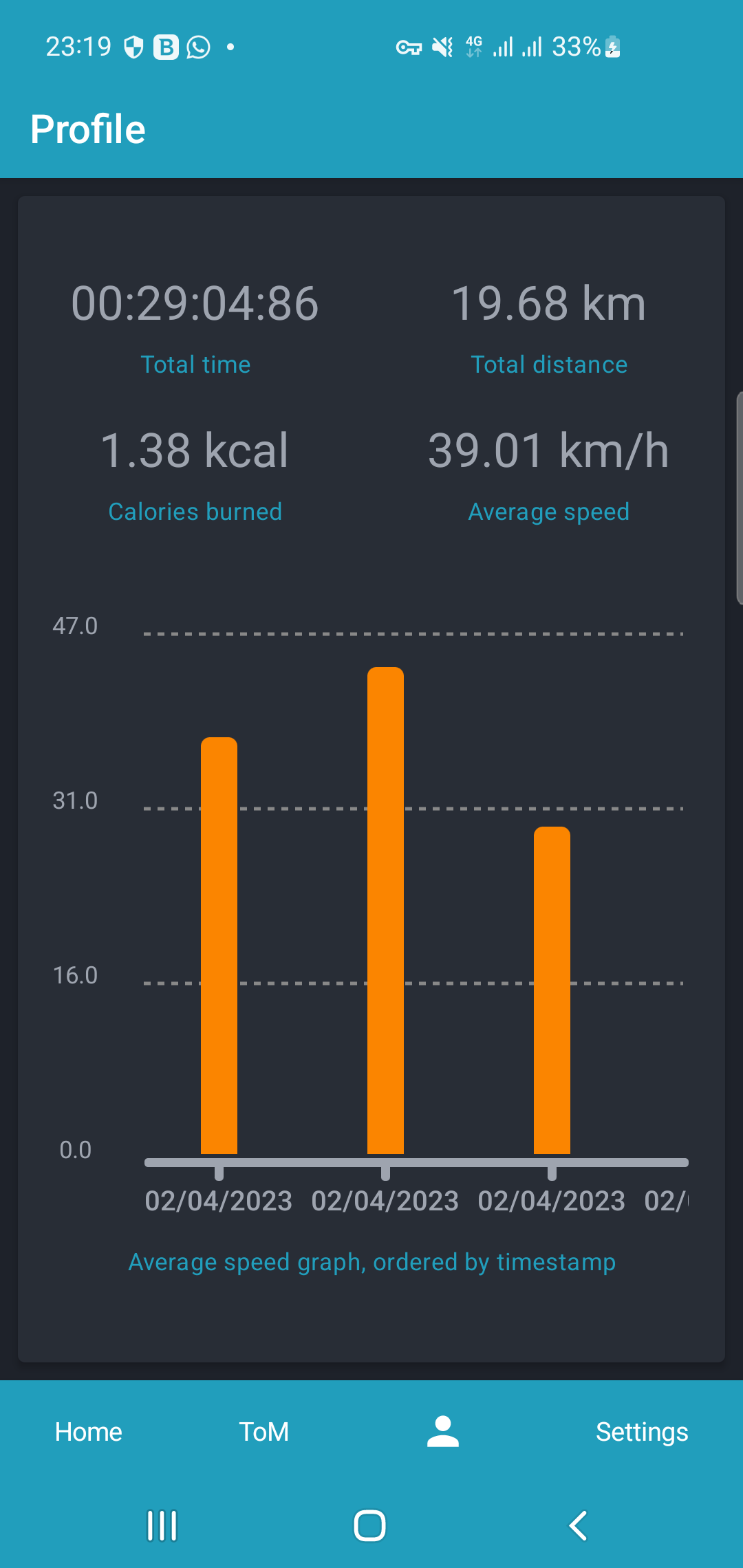
ProfileScreen
Presents aggregate statistics and a timeline ordered by timestamp.
SettingsScreen
Manages map appearance, measurement units, profile information, sign-out, and account deletion.
These screens and their associated ViewModels and use cases are described directly in the repository documentation.
Google Maps and the route
Google Maps is used both during active tracking and when reviewing saved sessions.
During recording, every accepted location contributes to the current polyline. The screen observes that route and redraws it without becoming responsible for collecting the points.
The map combines:
- the current location;
- camera behavior;
- the route polyline;
- the selected map style;
- line width and color;
- session state;
- location permissions.
MapConfig stores the map type, polyline width, and color. That configuration is also included in the saved session model.
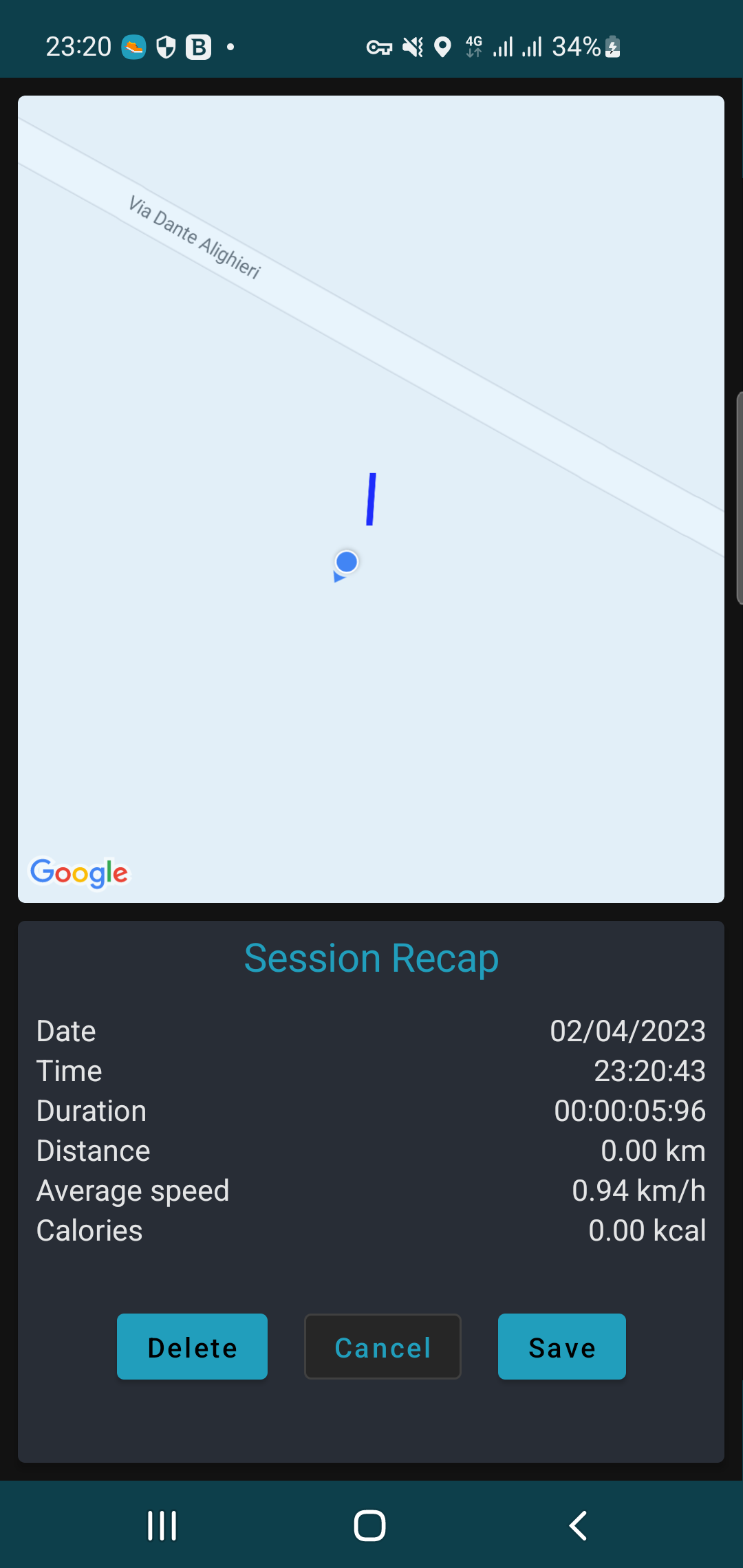
At the end of a session, the application captures an image of the route and uploads it to Firebase Storage. The returned URI becomes part of the session and is used as the thumbnail in the history. The build configuration includes both a Compose screenshot library and Coil for image loading.
Firebase as the backend
TrackOMatic uses four Firebase services:
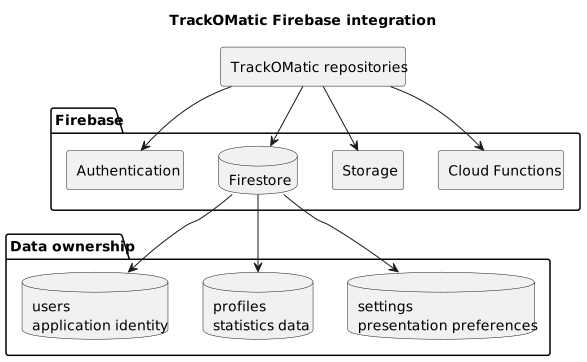
TrackOMatic Firebase integration and data architecture.
Each one owns a different responsibility.
Authentication
Handles:
- email and password;
- email verification;
- password recovery;
- user sessions;
- Google sign-in;
- sign-out;
- Google-token revocation.
Firestore
Stores structured data in four collections:
users;profiles;settings;sessions.
The documents are associated with userID, allowing the repositories to retrieve the data belonging to the authenticated user. Profile, settings, and session repositories return observable Flow values so changes can reach the UI without a manual refresh.
Storage
Stores the image generated for each saved session.
The resources are organized under the user's namespace, and their URI is associated with the session data.
Functions
Performs cleanup after account deletion.
The cloud function removes data associated with the user's identifier from Firestore and Storage, reducing the risk of leaving unreachable resources after the authentication account has been removed.
Why users, profiles, and settings are separate
The project stores application identity, personal information, and preferences separately.
These groups have different lifecycles.
users mirrors the authentication identity.
profiles contains information such as age, gender, height, and weight.
settings stores preferences such as the map style and measurement system.
users owns application identity, profiles owns data used for statistics, and settings owns presentation preferences. The Firebase diagram above makes that ownership explicit.
Keeping them separate makes repository behavior, update frequency, and access rules easier to reason about.
Changing the polyline color should not rewrite the user's profile.
Updating the user's weight should not require replacing the complete settings document.
Saving a completed session
When tracking ends, SaveDialog allows the user to:
- cancel and return to tracking;
- discard the activity;
- save it.
Saving requires at least two remote operations:
- uploading the route image;
- storing the session data.
The interface remains blocked until the operation finishes successfully, then navigates back to the history screen. The repository also documents separate use cases for deleting a session and deleting its image.
This creates a small distributed transaction.
Firestore and Storage are not modified through one atomic operation. The application must therefore define an order and account for intermediate failures.
The project does not implement a complete transactional layer between both services, but it makes their relationship explicit.
That matters.
When one logical resource is distributed between a database and object storage, removing only one half creates inconsistency.
Account deletion
Deleting an account is one of the most complete workflows in the application.
Removing the Firebase Authentication user is not enough.
The process also needs to handle:
- Google access;
- Firestore documents;
- Storage images;
- local session state;
- navigation back to authentication.
The repository documents a Cloud Function that removes the user's references from Firestore and Storage when the account is deleted.
This leaves the backend responsible for the final cleanup even if the Android application is interrupted during the process.
The lesson is straightforward:
Account deletion is not merely a button.
It is a product feature distributed across several systems.
Dagger Hilt
Dagger Hilt constructs the dependency graph.
It provides components such as:
- repositories;
- Firebase services;
- data sources;
- the location manager;
- ViewModels;
- tracking components.
The main benefit is not eliminating every manual constructor call.
It is making component ownership and lifecycle more explicit. The repository describes Hilt as the mechanism used to reduce manual dependency injection and connect dependencies to Android lifecycle containers.
This is particularly important in the tracking pipeline.
The service and ViewModel need to observe the same active tracking session, not independent repository instances created accidentally in different parts of the application.
Battery life and accuracy
One of the central lessons from the project concerns the relationship between data quality and energy cost.
Requesting the maximum available precision does not automatically create the best user experience.
A tracker needs to consider:
- location frequency;
- signal quality;
- actual movement;
- expected session duration;
- map rendering;
- background execution;
- notification updates;
- work performed for each point.
Reducing power consumption does not simply mean increasing the location interval.
It also means avoiding duplicated work.
The provider obtains a location.
The repository updates state.
The service decides whether to append it.
The UI presents the result.
If each layer repeated the same calculations and transformations, the application would consume more power without improving the route.
Correctness before abstraction
TrackOMatic uses more architectural structure than a small prototype strictly requires.
That made both the advantages and costs visible.
The advantages included:
- recognizable responsibilities;
- simpler screens;
- replaceable data implementations;
- uniform state representation;
- explicit asynchronous flows;
- a backend divided by responsibility.
The costs included:
- many classes;
- more steps required to follow one feature;
- very small use cases;
- adapters and wrappers that did not always add logic;
- higher initial development effort.
The direct repository access in ToMViewModel is probably the most useful part of the architecture experiment.
It demonstrates that a rule can be relaxed when the result is easier to understand and the ownership remains clear.
A project from its period
TrackOMatic reflects the Android stack used between late 2022 and early 2023.
The repository uses:
- Kotlin
1.8.0; - Jetpack Compose
1.3.3; - Hilt
2.44.2; - Firebase BoM
31.0.3; - Google Play Services Location
21.0.1; - Google Play Services Auth
20.4.1; compileSdk 33;targetSdk 33;minSdk 21.
Those versions are consistent with the period of development, but they are not a foundation I would publish unchanged today.
Google One Tap for Android is now deprecated, and Google's current recommendation is to migrate authentication to Credential Manager. Firebase's current Android Google-sign-in documentation also uses Credential Manager and the Google ID libraries instead of the project's legacy One Tap flow.
A modern revival would also need to review:
- the target SDK;
- location permissions;
- foreground-service declarations;
- restrictions on starting services;
- Google authentication;
- Compose and Firebase dependencies;
- approximate-location behavior;
- background-location policies.
Android's current guidance requires location foreground services to declare the appropriate service type and permission, while background location should be requested only when it is essential to the application's core user-facing behavior.
This does not reduce the value of the project.
It clarifies that TrackOMatic is a complete historical case study rather than an application ready for immediate publication in 2026.
What I learned
Tracking does not belong to the map
The map represents the session.
It should not own it.
Once that distinction is clear, background execution, notifications, and recomposition become easier to reason about.
Battery life is part of the experience
A route can look excellent during the first five minutes and still be a poor product if the same strategy becomes impractical during a long hike.
Accuracy needs to remain proportional to the real purpose of the application.
Architecture should explain the code
A layer that does not add a decision, boundary, or transformation may be only additional noise.
The intentional domain-layer bypass in the tracking flow was more useful than applying the architecture mechanically.
The backend completes the product
Many problems remain invisible while the data is mocked.
Once authentication, Storage, Firestore, and account deletion are introduced, the project needs to confront:
- intermediate failures;
- orphaned resources;
- synchronization;
- ownership;
- authorization;
- consistency.
Deleting is as difficult as saving
Saving a session creates related database and image resources.
Deleting the session must remove both.
Deleting an account extends the same responsibility to everything owned by that user.
Project status
TrackOMatic is complete and archived.
The public repository remains available as documentation of a native Android application combining:
- Jetpack Compose;
- MVVM;
- Clean Architecture;
- Coroutines;
FlowandStateFlow;- background tracking;
- a foreground notification;
- Google Maps;
- Firebase Authentication;
- Firestore;
- Storage;
- Functions;
- dependency injection through Hilt.
The README also records possible future directions that were never placed on an active roadmap, including OpenStreetMap, GPX import and export, session sharing, points of interest, and ghost routes.
Its current value is that of a complete case study: it shows how I approached an Android problem that crossed the interface, application architecture, operating system, and backend.
Conclusion
TrackOMatic began as an application for recording a route.
It quickly became something broader.
A position generated by the device moves from sensors and Google services through Flow, data sources, and repositories. From there, the foreground service and ViewModel maintain session and visible state, while the interface and Firebase provide presentation and persistence.
Each step introduced a responsibility:
- obtain the data;
- decide whether to keep it;
- update the session;
- present it;
- save it;
- synchronize it;
- delete it.
The most important part of the project is therefore not the polyline drawn on the map.
It is the architectural path that allows that line to continue existing when the screen disappears, become a session when the user saves it, and be removed completely when it is no longer needed.
In essence, TrackOMatic showed me that a familiar feature becomes technically interesting when it is treated as a complete product.
That is the value the project still retains.
Stack
Android · Kotlin · Jetpack Compose · MVVM · Clean Architecture · Coroutines · Flow · StateFlow · LifecycleService · Fused Location Provider · Google Maps · Firebase Authentication · Firestore · Storage · Functions · Dagger Hilt