
Introduction
Suppose you are working on a project with Git.
By mistake or distraction, you may create a commit that should not exist.
In that situation you need to undo it in the right way, choosing between two very different approaches.
The main commands are:
- The
revertcommand - The
resetcommand
The revert command
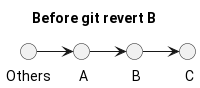
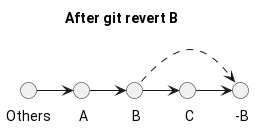
The revert command creates a new commit that reverses the changes from the commit we want to undo.
The basic form is:
git revert <commit to revert>The usual steps are:
- Run the
git logcommand. - Find the commit you want to revert.
- Copy the alphanumeric hash of the commit to revert.
- Run
git revert <commit to revert>.
Example.
cd project_with_a_dot_git_foldergit log### Example of the git log output## commit 2596f783998c8ec230b38a044b49e39d07770901 (HEAD -> main, origin/main)# Author: Foo <foo@bar.com># Date: Tue Apr 9 14:47:17 2024 +0200## Add something bad## commit 2ce5e2e7e36f23673b32ccef7f908f161527142b# Author: Foo <foo@bar.com># Date: Tue Apr 2 23:33:27 2024 +0200## Update somethinggit revert 2ce5e2e7e36f23673b32ccef7f908f161527142bAfter running the command, a new commit will be generated that reverses the earlier changes, without rewriting commit history.
The reset command
The alternative is the reset command.
git reset rewrites local history, so it should be used carefully, especially if the commits have already been shared. It moves HEAD to the selected commit; what happens to files and the index depends on the option used.
Soft reset
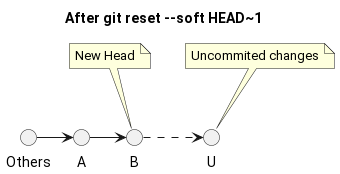
The --soft option moves HEAD while keeping the removed commit's changes staged in the index.
git reset --soft HEAD~1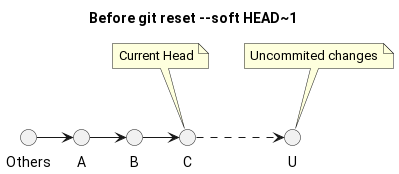
Hard reset
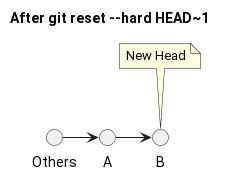
The --hard option aligns both the index and working tree with the selected commit, discarding local uncommitted changes too.
git reset --hard HEAD~1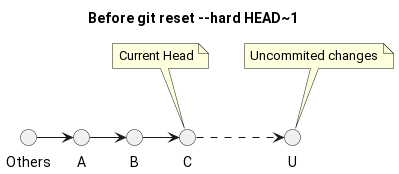
Conclusion
git revert is the safer choice for history that has already been shared, because it adds a new commit instead of rewriting existing ones. git reset is mainly useful for cleaning up local history before it is published.
Last updated
2026-02-03.
Article source content/blog/git_revert_commit.